

In April 2025, Northwestern University unveiled a pacemaker that fits inside a syringe tip just 3.5mm long. It gets injected directly into the heart, provides temporary support for days or weeks, then biodegrades completely. No surgery. No removal procedure. Just the right intervention, at the right time, then out of the way.
Your marketing automation platform should work the same way.
Right now, your team is stuck in manual mode. Uploading CSVs. Sending one-off emails. Manually scoring leads in spreadsheets. Creating sales alerts with calendar reminders. It's exhausting, error-prone, and impossible to scale.
Meanwhile, your competitors have automated systems that nurture leads 24/7, score prospects instantly, and trigger sales follow-ups at exactly the right moment. They're capturing 451% more qualified leads and seeing 544% ROI on their automation investments.
The gap isn't talent or budget. It's infrastructure.
This guide breaks down the best marketing automation platforms for IT services firms, by size, budget, and complexity, so you can choose the right fit, implement it fast, and start seeing ROI within weeks, not months.
Let's start with the problem you're trying to solve.
IT services marketing is brutal in ways SaaS or eCommerce marketers don't experience.
Your sales cycles stretch 6–18 months. Deals involve 6–10 stakeholders, CTOs, IT Directors, CFOs, procurement, end users. Each persona needs different messaging. Each stage requires different content. And if you drop the ball on nurturing for even a few weeks, prospects go cold or choose a competitor.
Manual lead nurturing doesn't scale. You can't personally email every prospect at the right time with the right message. You can't remember which leads downloaded your whitepaper vs. attended your webinar vs. visited your pricing page. And you definitely can't track multi-touch attribution when leads interact with you across 10+ channels.
IT services firms face complex, multi-stakeholder sales cycles that demand systematic, multi-touch nurturing, not one-off emails and hope.
Here's what breaks:
Your team burns out. They spend 60–70% of their time on manual execution, uploading lists, sending emails, updating CRM records, and only 30% on strategy, creative, and optimization.
Leads fall through cracks. Someone downloads a whitepaper. Sales doesn't follow up. Two months later, that prospect chooses a competitor. You never even knew they went cold.
Sales doesn't trust marketing. You're sending them unqualified leads because you have no systematic scoring. They stop following up. Your pipeline contribution tanks.
You can't prove ROI. Leadership asks, "What did marketing contribute to revenue this quarter?" You point to MQLs and website traffic, vanity metrics that don't tie to closed deals.
Now here's what changes when you implement the right platform:

This isn't theory. This is measured impact from companies that moved from manual to automated marketing operations.
Marketing automation platforms handle the grunt work so your team can focus on strategy:
Captures and qualifies leads automatically: Forms, landing pages, progressive profiling, leads enter your system and get tagged, scored, and routed without manual intervention.
Nurtures prospects through multi-touch sequences: Email drip campaigns triggered by behavior (downloaded whitepaper → send case study → invite to webinar → offer demo).
Scores leads based on behavior and fit: Visited pricing page three times + works at target company size + job title = CTO? That's a hot lead. Auto-alert sales.
Triggers sales alerts at the right moment: When a lead hits a score threshold or takes a high-intent action (attends demo, requests consultation), sales gets notified instantly.
Tracks multi-touch attribution and ROI: See which touchpoints, LinkedIn ad, blog post, webinar, email, contributed to each closed deal. Prove marketing's pipeline contribution with data, not guesses.
Not all marketing automation platforms are built for B2B IT services. Here's what you actually need.

Forms, landing pages, pop-ups, progressive profiling (asking different questions based on what you already know). Leads should flow into your system automatically, tagged with source, campaign, and behavior data.
Drip campaigns, behavior-based triggers, dynamic personalization (different content based on industry, role, stage). If someone clicks a link about cloud security, the next email should be about cloud security, not generic IT services.
Score leads based on demographic fit (job title, company size, industry) and behavioral engagement (pages visited, content downloaded, emails opened). High-score leads get prioritized; low-score leads stay in nurture.
Your automation platform must sync seamlessly with your CRM (Salesforce, HubSpot, Pipedrive, etc.). Leads, contacts, opportunities, and closed deals should flow bidirectionally. No CSV exports. No manual updates.
Email is critical, but it's not enough. Your platform should coordinate email, social ads (LinkedIn retargeting), SMS (for high-intent prospects), and even direct mail for ABM campaigns.
Multi-touch attribution shows the full buyer journey, not just last-click. Which campaigns sourced the most pipeline? Which content accelerates deals? Which channels deliver the highest ROI? You need dashboards that answer these questions.
For IT services firms targeting enterprise accounts, ABM is essential. Identify high-value accounts, coordinate campaigns across multiple stakeholders, track account-level engagement, and alert sales when accounts show buying signals.
Trigger-based actions, conditional logic, sales task automation. "If lead downloads whitepaper AND works at target account, send to sales with personalized note. If not target account, add to long-term nurture sequence".
Let's break down the top platforms based on what works for small, mid-market, and enterprise IT services firms.
If you're a 200+ employee IT services firm with complex sales cycles, multiple service lines, and enterprise clients, these platforms are built for you.
What it does well: Sophisticated lead scoring, revenue attribution, ABM capabilities, and over 600 integrations. Marketo is the gold standard for enterprise B2B marketing automation.
Pricing: Contact Adobe for pricing (typically $2,000+/month for mid-sized deployments).
Best for: Enterprise IT firms with complex, multi-stakeholder sales cycles, dedicated marketing operations teams, and budget for premium tools. Customers report 25% increase in marketing ROI after implementation.
Cons: Expensive. Complex implementation (expect 3–6 months). Steep learning curve. Requires dedicated admin or agency support.
What it does well: If you're already using Salesforce CRM, Pardot is the natural choice. Deep native integration, Einstein AI insights for predictive lead scoring, and comprehensive B2B analytics.
Pricing: Starts at $1,250/month (10,000 contacts).
Best for: IT services firms deeply invested in the Salesforce ecosystem who want seamless CRM-marketing alignment.
Cons: Long implementation timelines. Expensive. If you're not using Salesforce CRM, you're paying for integration depth you don't need.
What it does well: Enterprise-level scalability, 500+ pre-built integrations, and comprehensive campaign orchestration capabilities.
Pricing: Starts at $2,000/month.
Best for: Large enterprises (1,000+ employees) with global operations and complex regulatory requirements.
Cons: Expensive. Tedious implementation. Overkill for mid-market firms.
If you're a 50–200 employee IT services firm that's outgrown basic tools but doesn't need enterprise complexity, these platforms hit the sweet spot.
What it does well: All-in-one platform, CRM, marketing automation, sales tools, service hub, all unified. User-friendly interface. Extensive education resources (HubSpot Academy). Native integrations with hundreds of tools.
Pricing: Free plan available. Marketing Hub Professional starts at $890/month (2,000 contacts). Marketing Hub Enterprise starts at $3,600/month.
Best for: IT firms that want a unified growth platform with CRM included. Perfect if you're starting fresh or consolidating scattered tools.
Customer impact: 57% of customers saw an increase in leads generated after implementing HubSpot.
Cons: Can get expensive quickly as you scale contacts and add features. Some advanced capabilities (predictive lead scoring, custom reporting) locked behind Enterprise tier.
Why it works for IT services: The all-in-one model eliminates data silos. Marketing and sales share the same CRM. Attribution is built-in. And the learning curve is manageable, your team can be productive within weeks, not months.
What it does well: Advanced automation workflows with visual automation maps. Built-in CRM. Sophisticated lead scoring. Powerful email personalization and segmentation.
Pricing: Starts at $39/month (2,500 contacts). Automation features unlock at $49/month+. CRM included at higher tiers.
Best for: IT firms needing powerful automation without enterprise price tags. Great for teams that want flexibility and don't mind a steeper learning curve.
Cons: Interface can feel overwhelming for beginners. Lacks some SaaS-specific integrations (e.g., product usage data sync).
Why it works for IT services: ActiveCampaign punches way above its price point. You get enterprise-grade automation workflows, lead scoring, and CRM for a fraction of Marketo's cost. Perfect for growing firms that need power and affordability.
If you're a <50 employee IT services firm with limited budget, these platforms deliver automation without breaking the bank.
What it does well: Affordable pricing ($5–$17/month). Tight integration with Zoho CRM and the entire Zoho ecosystem (Desk, Analytics, SalesIQ). Sophisticated workflows despite low price.
Pricing: Forever Free plan (2,000 contacts). Standard $17/month. Professional $29/month.
Best for: Small IT firms already using Zoho CRM or budget-conscious teams willing to trade some UX polish for cost savings.
Cons: Less intuitive than HubSpot or ActiveCampaign. Limited customer support options on lower tiers.
Why it works for IT services: If you're in the Zoho ecosystem, this is a no-brainer. Everything syncs natively. And the price is unbeatable for the functionality you get.
What it does well: GDPR-native EU hosting. Multi-channel automation (email, SMS, WhatsApp). Fair contact-based pricing (no email send limits on paid plans).
Pricing: Free plan available. Paid plans start at $9/month.
Best for: IT services firms with EU clients requiring GDPR compliance, or companies needing SMS/WhatsApp automation alongside email.
Cons: Fewer enterprise features than competitors. Smaller integration ecosystem.
Why it works for IT services: Brevo balances affordability with solid multi-channel capabilities. If you serve European clients, the GDPR-native hosting is a major plus.
What it does well: Behavior-based triggers and powerful automation built specifically for B2B. No tech headaches, designed for marketers, not developers. Clean, intuitive interface.
Pricing: Transparent pricing available on their site.
Best for: B2B IT teams that want powerful automation without complexity or enterprise bloat.
Integrations: HubSpot, Salesforce, Stripe, Zapier, Segment, and 50+ others.
Why it works for IT services: Encharge is purpose-built for B2B companies. You get sophisticated automation without the learning curve of enterprise platforms.
Sometimes your IT services firm has a unique requirement that general-purpose platforms don't address. Here are niche leaders.
What it does well: Intent data and predictive analytics. 6Sense processes over 1 trillion buying signals daily to identify accounts actively researching solutions, before they contact you.
Best for: IT firms focusing on ABM and buyer intent signals. Perfect for enterprise sales where knowing who is in-market can shorten sales cycles dramatically.
Unique capability: 6Sense identifies accounts researching solutions based on content consumption, search behavior, and third-party intent data. You reach prospects when they're actively evaluating, not months later.
What it does well: AI-powered prospecting. Clay combines data from 75+ providers (Clearbit, ZoomInfo, LinkedIn, etc.) to enrich leads and automate complex prospecting workflows.
Pricing: Free tier (100 credits). Starter plan $149/month.
Best for: IT firms with complex prospecting needs and longer sales cycles that require deep account research.
Why it's different: Clay isn't traditional marketing automation, it's prospecting infrastructure. Use it to build hyper-targeted lists, enrich leads with technographic data, and automate outreach.
What it does well: Multi-channel orchestration beyond just email, SMS, Slack notifications, push notifications, webhooks. Powerful workflow builder with complex conditional logic.
Pricing: Starts at $100/month.
Best for: IT firms needing advanced multi-channel orchestration, especially if you're delivering software alongside services and need in-app messaging.
Here's how the top platforms stack up on the features that matter most for IT services.
Decision paralysis is real. Here's how to cut through the noise.
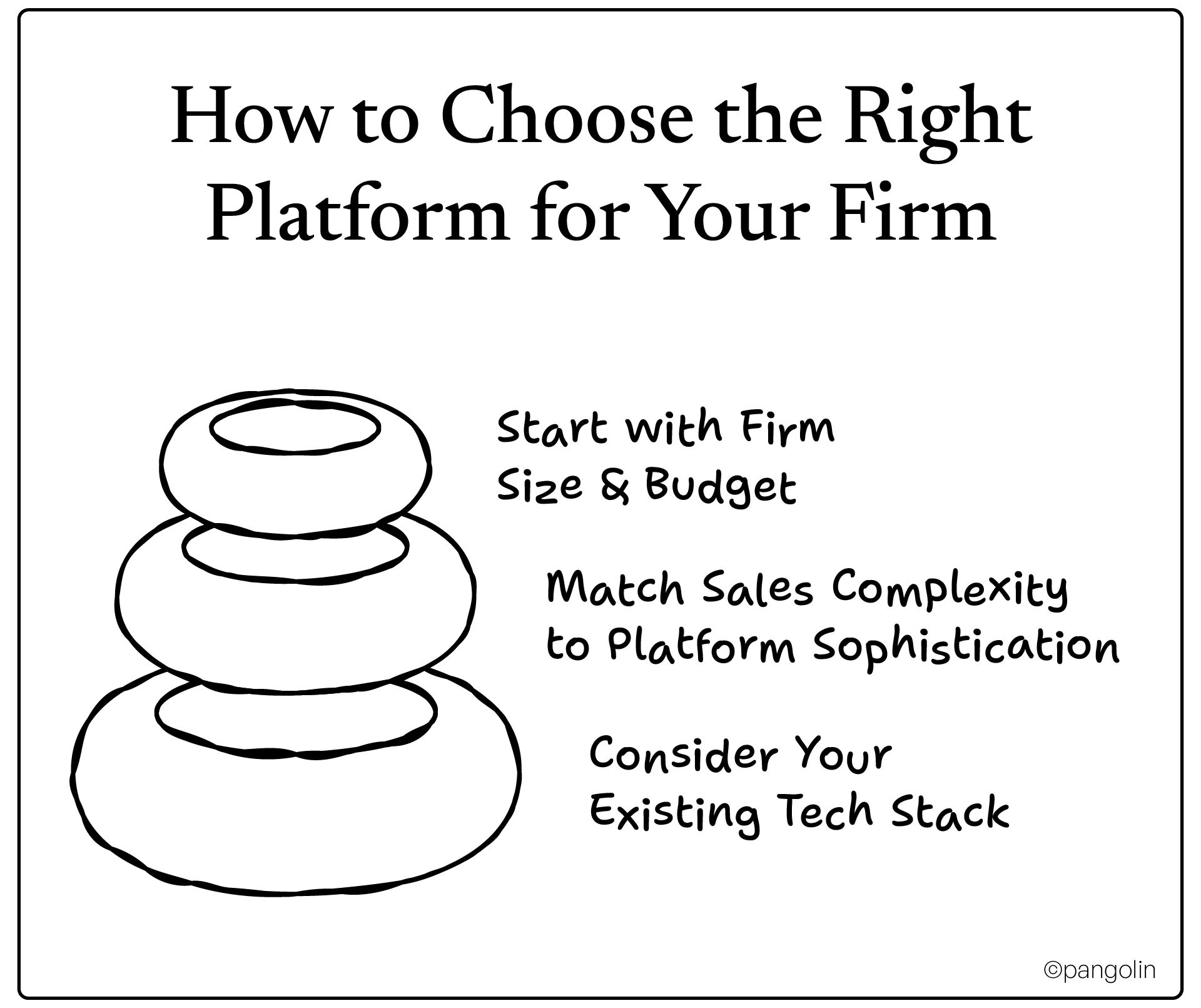
Small firms (<50 employees): Budget $50–$300/month. Focus: Zoho, Brevo, Encharge, or HubSpot's free tier.
Mid-size firms (50–200 employees): Budget $500–$2,000/month. Focus: HubSpot Marketing Hub Professional, ActiveCampaign.
Enterprise firms (200+ employees): Budget $2,000–$10,000+/month. Focus: Marketo, Pardot, Eloqua.
Transactional/short sales cycles (1–3 months, single decision-maker): You don't need Marketo. Focus on email automation and lead capture. HubSpot, ActiveCampaign, or Brevo work great.
Complex/long sales cycles (6–18 months, multi-stakeholder): You need advanced lead scoring, ABM, and multi-touch attribution. Prioritize Marketo, Pardot, or HubSpot Enterprise.
Already using Salesforce CRM? → Pardot is the obvious choice.
Already using HubSpot CRM? → HubSpot Marketing Hub integrates seamlessly.
Already using Zoho? → Zoho Campaigns is a no-brainer.
Starting fresh or using a basic CRM? → HubSpot (includes CRM) or ActiveCampaign (includes CRM at higher tiers) give you the most flexibility.
Use this to evaluate platforms during demos:
Buying the platform is just step one. Here's how to roll it out without wasting months.
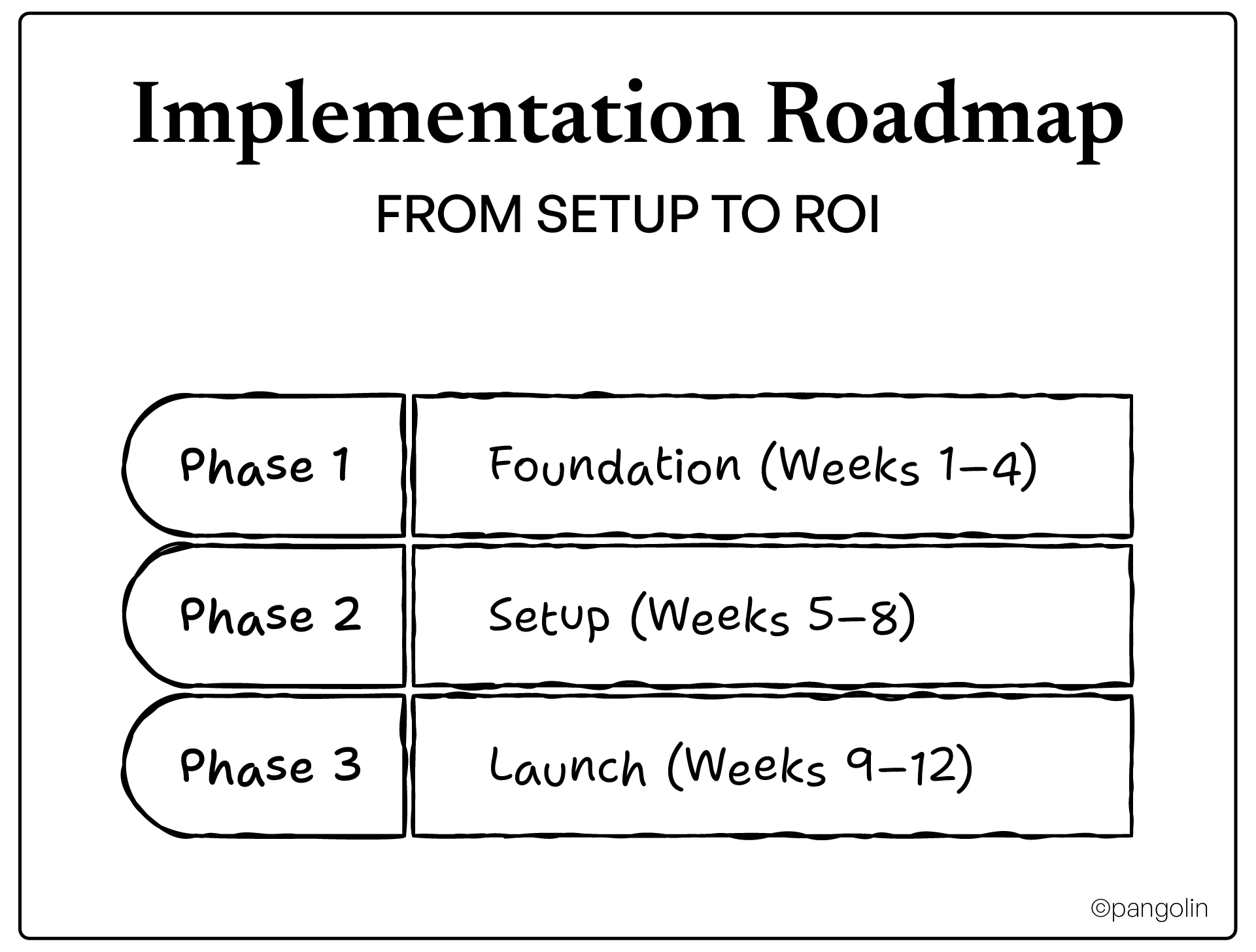
Audit current processes: Map how leads currently flow, from capture to nurture to handoff to sales. Where are the gaps? Where does manual work slow things down?
Clean and segment CRM data: Garbage in = garbage out. Dedupe records. Standardize field values (industry, company size, job title). Segment by persona and lifecycle stage.
Define lead scoring criteria: What behaviors indicate buying intent? (Pricing page visit = +10 points. Whitepaper download = +5 points.) What demographic factors indicate fit? (Target industry = +15 points. Target job title = +10 points.)
Map buyer journey and key touchpoints: Identify the critical moments, awareness, consideration, decision, retention. What content exists for each stage? Where are the gaps?
Configure platform and integrate CRM: Connect your automation platform to your CRM. Map fields. Test bidirectional sync (changes in one system should update the other).
Build core email templates and workflows: Start simple. Welcome email for new subscribers. Nurture sequence for whitepaper downloaders. Re-engagement sequence for cold leads. Refine later.
Set up lead capture forms and landing pages: Build forms with progressive profiling (ask different questions based on what you already know). Create landing pages for top offers.
Establish reporting dashboards: Set up dashboards tracking leading indicators (email open rates, click rates, form submissions, MQLs) and lagging indicators (pipeline, closed/won revenue, ROI).
Deploy initial nurture campaigns: Turn on your first automated workflows. Monitor closely for the first week, catch errors early.
Test workflows and troubleshoot: Submit test leads. Walk through the full experience. Are emails sending? Are scores updating? Are sales alerts triggering?
Train team on platform usage: Don't assume intuition. Run training sessions. Create documentation. Assign a platform admin who owns ongoing optimization.
Monitor performance and optimize: Check dashboards weekly. What's working? What's not? A/B test subject lines, CTAs, and content offers. Iterate fast.
Don't expect instant magic. Here's the realistic timeline:
Even the best platforms fail if you make these mistakes.
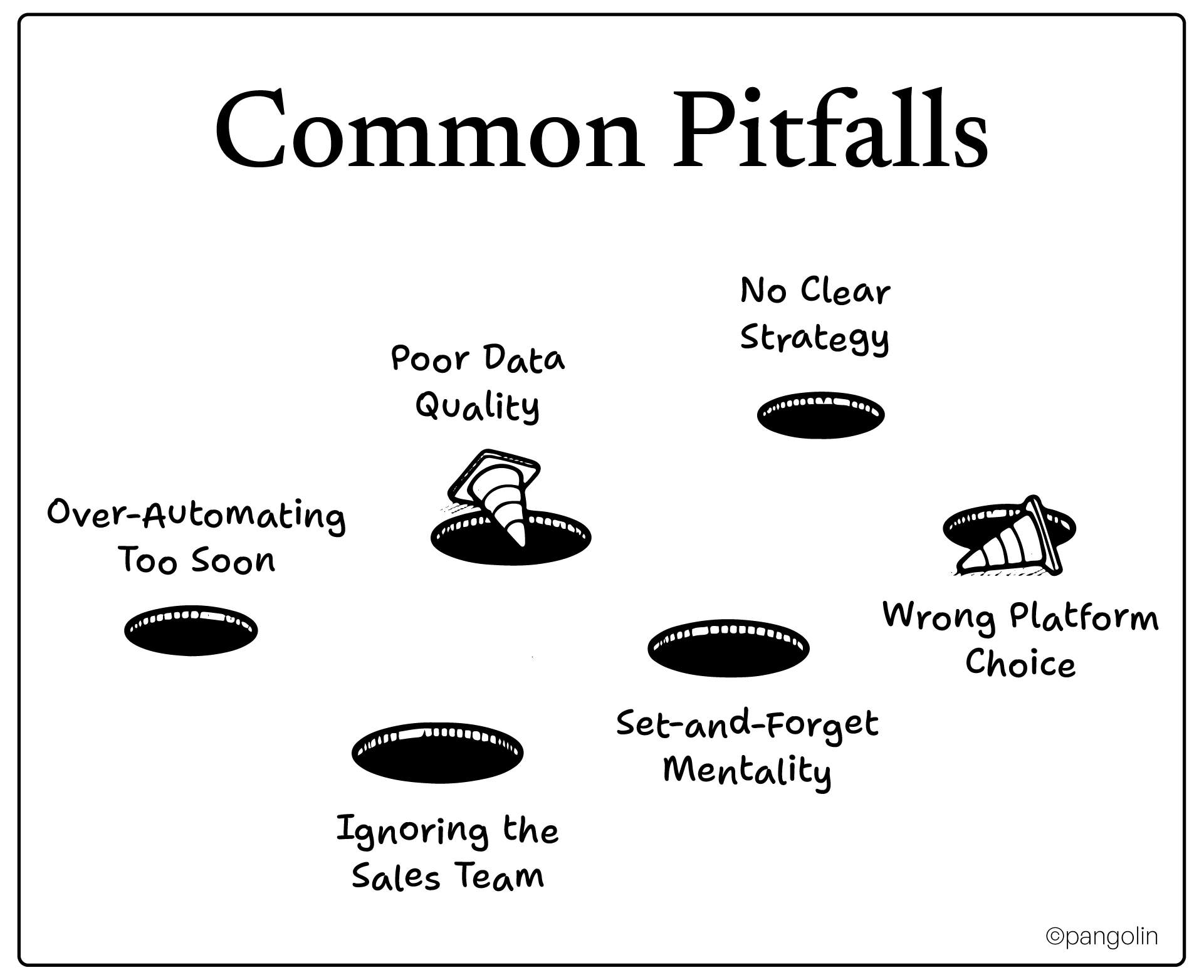
You buy Marketo and try to automate everything on day one. Result: broken workflows, confused prospects, frustrated sales team.
Fix: Start with 2–3 high-impact workflows. Master them. Then expand. Crawl, walk, run.
Your CRM is a mess, duplicates, missing fields, inconsistent formatting. You connect it to your automation platform. Now the mess is automated.
Fix: Clean your CRM before you implement automation. Dedupe. Standardize. Validate. Good data is the foundation.
You buy the technology but skip the strategy. You have a fancy platform that sends random emails with no cohesive buyer journey.
Fix: Map your strategy first. What are the goals? What does success look like? Which workflows deliver the most value? Then configure the platform to execute that strategy.
Marketing builds automated workflows without talking to sales. Leads get scored and routed, but sales doesn't trust the scores or follow up.
Fix: Involve sales from day one. Define MQL criteria together. Agree on handoff process. Build feedback loops so sales can flag bad leads and marketing can refine scoring.
You launch campaigns, then never touch them again. Open rates decline. Engagement drops. But you're too busy to notice.
Fix: Schedule monthly optimization reviews. Check performance. A/B test. Refresh content. Update scoring rules. Automation doesn't mean "ignore it forever."
You buy enterprise tools for SMB needs (paying for features you'll never use) or budget tools for enterprise complexity (hitting scaling limits within months).
Fix: Be honest about your firm size, budget, and complexity. Match the platform to your reality, not your aspirations.
Ready to pull the trigger? Here's your first month.
It's infrastructure.
Your IT services firm can't scale lead generation, nurture prospects through long sales cycles, or prove marketing ROI without it. Manual processes worked when you were smaller. They don't work now.
The data is clear: companies using marketing automation see 451% more qualified leads, 544% ROI, and 25% higher revenue. And 76% achieve full ROI within 12 months.
The question isn't whether to automate. It's which platform fits your firm.
Start with your firm size and budget. Match platform sophistication to sales complexity. Prioritize CRM integration and lead scoring capabilities. Implement in phases, foundation, setup, launch. Avoid the common pitfalls, over-automating, poor data, ignoring sales.
The right platform frees your team from manual grunt work, nurtures leads systematically, and proves marketing's pipeline contribution with hard data. That's how you scale without adding headcount. That's how you prove ROI to leadership. That's how you win.
Need help choosing and implementing the right marketing automation platform for your IT services firm? Pangolin specializes in revenue automation, full-funnel growth marketing, and RevOps for B2B IT companies. We'll guide you through platform selection, build your workflows, integrate with your CRM, and train your team so you see ROI in weeks, not months.
ROI timelines unfold in phases, not overnight. You'll see leading indicators within 3–6 months, improved team efficiency, higher campaign engagement rates, and better lead quality. These early wins build momentum and prove the strategy is working. However, significant revenue-based ROI typically materializes within 9–12 months, allowing for full sales cycles to complete and nurtured leads to convert into closed deals. Importantly, 76% of companies achieve positive ROI within one year, and 12% see returns in less than a month. The key variables affecting timeline are your sales cycle length, data quality at implementation, and how quickly you deploy automated workflows.
The industry benchmark is compelling: companies typically earn $5.44 for every $1 invested in marketing automation, equating to a 544% ROI over three years. For IT services firms specifically, a strong return is often a 5:1 to 10:1 ratio of revenue generated to platform cost. However, don't focus solely on revenue, operational ROI matters too. Reclaiming 15–20% of your team's time by automating repetitive tasks represents significant operational savings that should be central to your business case. The most important benchmark is your own performance improvement over pre-automation metrics, that's how you prove the platform is moving the needle.
The decision hinges on firm size, complexity, and existing tech stack. Marketo is built for larger enterprises (200+ employees) with complex, multi-stakeholder sales cycles, dedicated marketing operations teams, and enterprise budgets ($2,000+/month). It offers sophisticated lead scoring, revenue attribution, and ABM capabilities but requires technical expertise and often 3–6 months implementation. HubSpot is ideal for small to mid-sized firms (50–200 employees) seeking an all-in-one platform with CRM included. It's user-friendly, faster to implement (weeks not months), and starts at $890/month for Professional tier. HubSpot customers report 57% increase in leads generated. If you already use Salesforce CRM, consider Pardot for seamless integration. If you're starting fresh or want unified growth infrastructure, HubSpot delivers the best balance of power and usability.
Absolutely, automation isn't just for enterprises anymore. Budget-friendly platforms like Zoho Campaigns ($17/month), Brevo ($9/month), and Encharge.io deliver powerful automation without enterprise price tags. Even HubSpot offers a free tier with basic automation features. The more important question is: can you afford not to automate? Manual lead nurturing doesn't scale, and you're likely losing deals to competitors with automated systems capturing 451% more qualified leads. Start with high-impact workflows (welcome series, webinar nurture, re-engagement), prove ROI with quick wins, then scale gradually. Small IT firms can outperform larger competitors by implementing targeted automation rather than broad-based manual efforts.
Choosing the wrong platform costs 6–12 months of wasted time, thousands in sunk implementation costs, and team frustration that damages adoption of future automation efforts. Common mistakes include buying enterprise tools for SMB needs (paying for complexity you'll never use) or budget tools for enterprise complexity (hitting scaling limits within months). The fix: Be honest about your firm size, sales cycle complexity, and budget. Match platform sophistication to your reality, not your aspirations. Demo 2–3 platforms in your tier, test CRM integration depth, and involve sales in the evaluation to ensure lead handoff processes align. Ask vendors about implementation timelines, training requirements, and total cost of ownership, not just platform fees.
It depends on platform complexity and firm size. Enterprise platforms (Marketo, Eloqua) typically require a dedicated marketing operations specialist or agency support to build workflows, maintain integrations, and optimize performance. Mid-market platforms (HubSpot, ActiveCampaign) are designed for marketers to manage themselves, though larger teams (50+ employees) often benefit from a part-time or full-time admin. Budget platforms (Zoho, Brevo, Encharge) are self-serve by design, your existing marketing team can handle them with minimal training. Regardless of platform, assign one person as the "automation owner" responsible for workflow optimization, reporting, and troubleshooting. This prevents the "everyone's responsible, so no one's responsible" trap that kills automation ROI.
Integration quality varies dramatically by platform. Native integrations (HubSpot ↔ HubSpot CRM, Pardot ↔ Salesforce) offer the deepest sync, bidirectional data flow, real-time updates, and field-level mapping. Third-party integrations via Zapier or native connectors work for most platforms but may have sync delays or limited field mapping. Before choosing a platform, verify: (1) Does it integrate with your CRM? (2) Is it native or third-party? (3) What data syncs bidirectionally? (4) Are there sync limits or delays?. Test integration thoroughly before launch, submit test leads and verify data flows correctly in both directions. Poor CRM integration is the #1 reason automation implementations fail, leads fall through cracks and sales loses trust in marketing.
Email marketing is a subset of marketing automation, not the whole picture. Email platforms (Mailchimp, Constant Contact) send emails, that's it. Marketing automation platforms orchestrate multi-channel campaigns including email, social ads, SMS, landing pages, forms, lead scoring, CRM sync, and sales alerts, all triggered by prospect behavior. For example: A prospect downloads your whitepaper (captured via form) → gets tagged in CRM → enters automated nurture sequence (5 emails over 14 days) → clicks pricing link → lead score increases → sales gets real-time alert with full engagement history. That level of coordination requires marketing automation, not just email software. If your IT services sales cycles are long (6+ months) with multiple stakeholders, you need full automation.
No automation amplifies sales, it doesn't replace it. Marketing automation handles repetitive, scalable tasks: capturing leads, qualifying prospects, nurturing through multi-touch sequences, and alerting sales at the right moment. But closing complex IT services deals still requires human relationship-building, custom proposals, technical demonstrations, and negotiation. The goal is sales and marketing alignment, not replacement. Automation ensures sales only spends time on qualified, engaged prospects, not chasing cold leads or manually following up on whitepaper downloads. Companies with strong sales-marketing alignment see 14.5% increase in sales productivity after implementing automation. The key is involving sales in defining MQL criteria, handoff processes, and lead scoring rules so they trust the leads marketing delivers.

