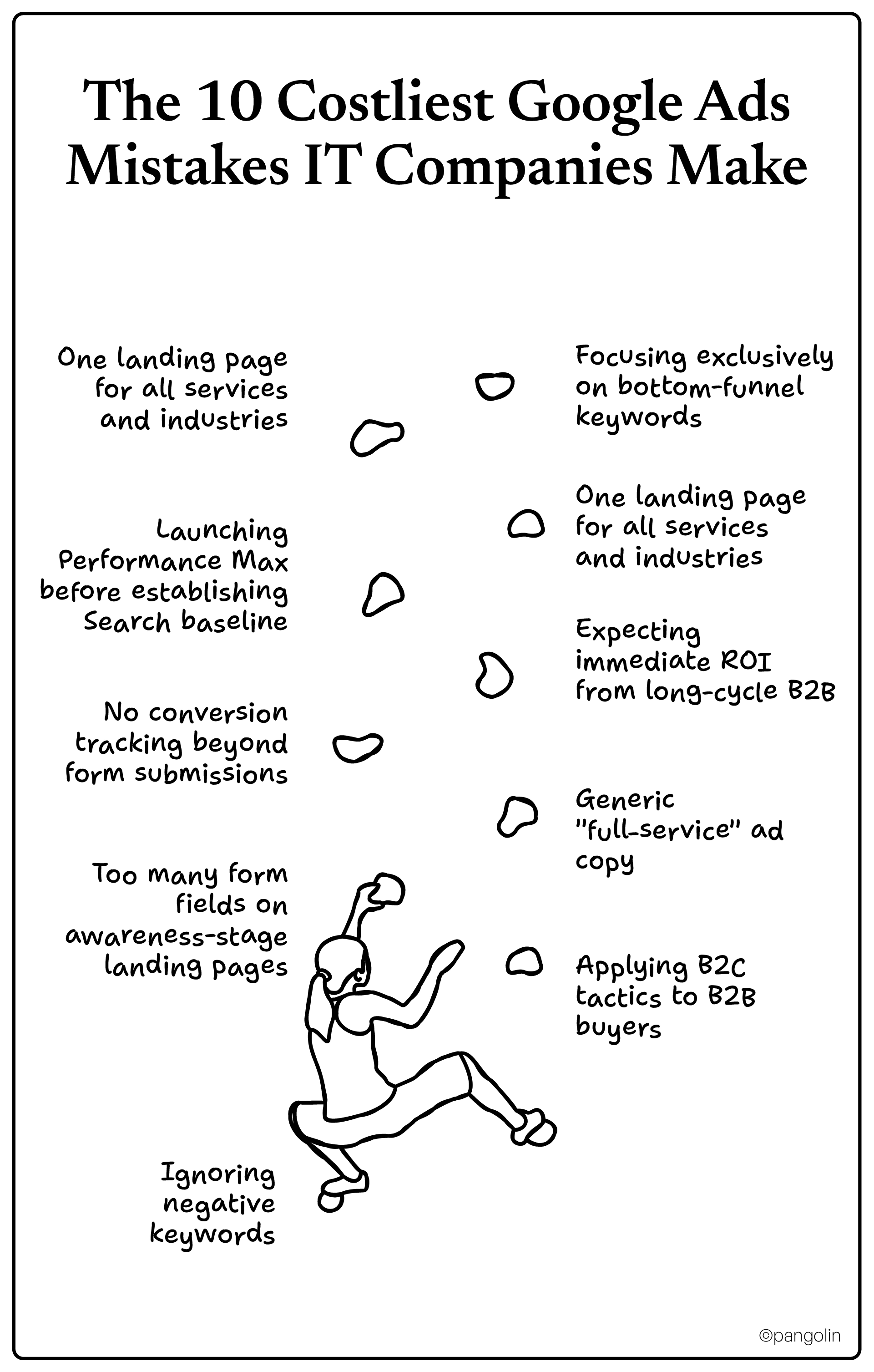
IT services face $8-$11 average CPC with B2B sales cycles of 5+ months, success requires full-funnel strategies, not B2C tactics
20-30% of Google Ads budget wastes on job seekers and DIY searches without aggressive negative keyword management, weekly search term reviews save $500-$2K monthly
Conversion tracking must measure qualified leads (not just form fills) with CRM integration to prove ROI across long sales cycles
Landing pages optimized for B2B tech buyers use 3-4 form fields, outcome-focused headlines, and industry-specific trust signals to convert at 10%+ vs. 2-3% generic pages
Performance Max works only after establishing Search baseline, with $600+ monthly budget and 15+ conversions, launching too early wastes $10K+
Multi-touch attribution and revenue tracking separate profitable campaigns from budget-burners in B2B environments with multiple touchpoints
In August 2024, California ground squirrels shocked researchers by abandoning their lifelong vegetarian diet and systematically hunting voles. These squirrels, herbivores for millions of years, watched the vole population explode to 7x normal levels and made a choice: adapt or starve. So they adapted. They started ambushing voles at burrow entrances, biting their necks, and consuming them. By the end of the season, researchers documented at least 37 kills by multiple squirrels who'd never eaten meat before.
Your IT services company faces a similar moment right now.
The referrals that built your business? Plateaued. The word-of-mouth that kept sales steady? Not enough anymore. The old playbook, networking events, cold calls, waiting for inbound, can't feed the growth targets your CEO just set. You need qualified leads at scale. And for 68% of IT services companies, that means Google Ads.
Here's the problem: you're burning $5,000, $10,000, or $20,000 per month on Google Ads and getting clicks from job seekers, DIY hobbyists, and tire-kickers who'll never sign a contract. Your average cost per click sits at $8 to $11, sometimes $50+ for competitive terms. Leadership wants to know why marketing can't prove ROI. Sales complains the leads are garbage. And you're stuck justifying every dollar while competitors seem to dominate the Map Pack and paid results.
The gap between wasting budget and generating qualified pipeline isn't luck. It's strategy, specifically, B2B strategies designed for long sales cycles, multi-stakeholder decisions, and high-value contracts. Not the B2C tactics most Google Ads content assumes.
This guide shows you exactly how IT services companies turn expensive clicks into predictable, qualified leads. We're talking real frameworks with actual benchmarks: what Google Ads costs for IT companies, which campaigns work for 5-month B2B sales cycles, how to stop bleeding budget on wrong-fit prospects, and how to prove ROI to skeptical leadership.
Like those squirrels, you adapt or you starve. Let's make sure you thrive.
The $50 Click Problem: Understanding Google Ads for IT Services
What you're actually up against (the real numbers)
Let's rip the band-aid off with hard data. If you're running Google Ads for IT services right now, here's what you're competing against:
Industry cost benchmarks for 2025:
Average CPC for IT/technology sector: $8.34 to $11.12
Competitive keywords like "managed IT services [major city]": $20 to $50+ per click
Average cost per lead (B2B): $200
Demo or consultation request: $600 to $800
Typical monthly spend for MSPs generating meaningful results: $5,000 to $50,000
Now here's the silver lining: businesses earn $2 for every $1 spent on Google Ads when campaigns are structured properly. With optimization, that return jumps to $8 per dollar.
The difference between those two outcomes? Understanding that IT services require fundamentally different PPC strategies than pizza shops, plumbers, or even B2C SaaS companies.
Why generic Google Ads advice destroys IT services budgets
Most Google Ads content assumes you're selling impulse purchases with short conversion windows. But IT services operate in a completely different universe:
The B2B IT services reality:
Sales cycles average 5+ months (not 5 minutes)
Buying committees average 5.2 decision-makers (CTO, CFO, IT Director, Operations, CEO)
70% of the buyer journey happens before first vendor contact (they're researching you right now)
Customer lifetime value justifies higher acquisition costs ($50K+ annual contracts support $2K+ CAC)
Trust and credibility matter more than urgency (unlike "emergency plumber" searches)
When you apply B2C tactics, urgent calls-to-action, limited-time offers, impulse-focused messaging, to B2B IT services, you get clicks from people who'll never become customers. You're fishing with the wrong bait in the wrong pond.
What works instead: full-funnel strategies addressing awareness, consideration, and decision stages. Campaigns that acknowledge decision-makers are researching for months before they contact you. Messaging that builds credibility, not urgency.
54.8% of IT services companies cite generating qualified leads as their biggest marketing challenge. The problem isn't traffic, it's attracting the right traffic at the right stage of the buying journey.
The shift you need to make (right now)
Traditional Google Ads thinking:
More clicks = more leads = more customers
Target bottom-funnel keywords only (high intent = better ROI)
Optimize for lowest cost per click
Judge campaigns in first 30 days
B2B IT services thinking:
Right clicks = qualified leads = customers who fit ICP
Optimize for highest lead quality and customer lifetime value
Judge campaigns after 90+ days to account for long sales cycles
This mindset shift alone will save you thousands in wasted spend.
Campaign Foundation: Build It Right or Waste Your Budget
Conversion tracking that actually matters (not just form fills)
Here's where most IT companies blow it from day one: they track form submissions and call it "conversion tracking." But that 23-year-old submitting your contact form asking if you have "entry-level positions available"? That counted as a conversion. So did the guy looking for free YouTube tutorials on network troubleshooting.
Set up qualified lead tracking instead.
Define qualification criteria first:
Company size match (employee count, revenue range you serve)
Industry fit (specific verticals where you have expertise)
Geographic fit (within your service area)
Budget indicators (requesting pricing, demo, proposal, not "just exploring")
Decision-maker role (IT Director, CTO, Operations, not intern researching a school project)
Conversion actions that track quality, not just volume:
Qualified lead (meets your ICP criteria)
Converted lead (Sales accepted as legitimate opportunity)
Why this matters: Google's algorithm needs at least 15 conversions in the last 30 days to optimize effectively. If you're feeding it garbage data (all form fills = conversions), it'll optimize for more garbage.
Advanced tracking that separates amateurs from pros:
Enhanced conversions for leads: Provides 10% more conversions on average by improving attribution
Offline conversion imports: Connect closed deals back to original Google Ads click
CRM integration: HubSpot, Salesforce, or Pipedrive sync for full lifecycle tracking
This isn't optional anymore. Without proper conversion tracking, you're flying blind while bleeding budget.
Campaign structure that drives qualified leads
Random campaigns with random keywords generate random results. Strategic architecture generates predictable pipeline.
Organize campaigns by service type -
Campaign 1: Managed IT Services
Keywords: "managed IT services [city]," "IT support for small business," "outsourced IT department"
Add click-to-call for mobile (60% of B2B searches happen on mobile)
Track calls separately from form fills
Use call-only ads for high-intent mobile searches
Location extensions:
Connect Google Business Profile (if applicable)
Shows address and distance to searcher
Particularly important for local service area businesses
Landing Pages That Close B2B Tech Buyers
The one-conversion-goal rule
Companies with 10-15 landing pages see 55% more leads than those with fewer pages. But here's the catch: each page needs one conversion goal only.
Multiple CTAs kill conversion rates. When you offer "Request Demo," "Get Quote," "Schedule Call," AND "Download Guide" on the same page, decision-makers freeze. Choice paralysis is real.
Pick one goal per landing page:
Request cybersecurity assessment
Get managed IT quote
Schedule cloud migration consultation
Download IT cost calculator
Don't mix them. Create separate landing pages for each.
Outcome-focused headlines (not feature dumps)
Bad headline: "Comprehensive IT Solutions for Growing Businesses"
Why it fails: Generic, feature-focused, says nothing concrete.
Good headline: "Cut IT Costs 25% Without Sacrificing Security or Support"
Why it works: Specific outcome, addresses pain point (cost), removes objection (quality concern).
More winning headline formulas:
"99.99% Uptime Guarantee or You Don't Pay" (risk-reversal)
"Stop Paying for Downtime: Get 24/7 Monitoring for $X/Month" (pain + solution + price)
"HIPAA-Compliant IT Infrastructure in 30 Days or Less" (outcome + timeframe)
Address the specific pain point in the first 5-7 words. Everything else is supporting evidence.
Form field optimization (because less is more)
80% of landing page traffic comes from mobile devices. Long forms on mobile = abandoned conversions.
Form length by funnel stage:
Awareness stage (top-funnel offers like guides, assessments):
Name
Email
Company
Phone (optional)
3-4 fields maximum. You're building the relationship, not qualifying yet.
Consideration stage (mid-funnel offers like consultations):
Name
Email
Company
Phone
Company size
Industry
5-6 fields. You need some qualification but not full discovery.
Decision stage (bottom-funnel offers like quotes, demos):
Name
Email
Company
Phone
Company size
Industry
Current IT setup
Specific needs/challenges
7-9 fields OK. These prospects are ready to have detailed conversations. Extra fields actually improve lead quality by pre-qualifying.
Sounds magical, right? It can be, or it can burn $10,000 before you realize it's not working.
When Performance Max works for IT services
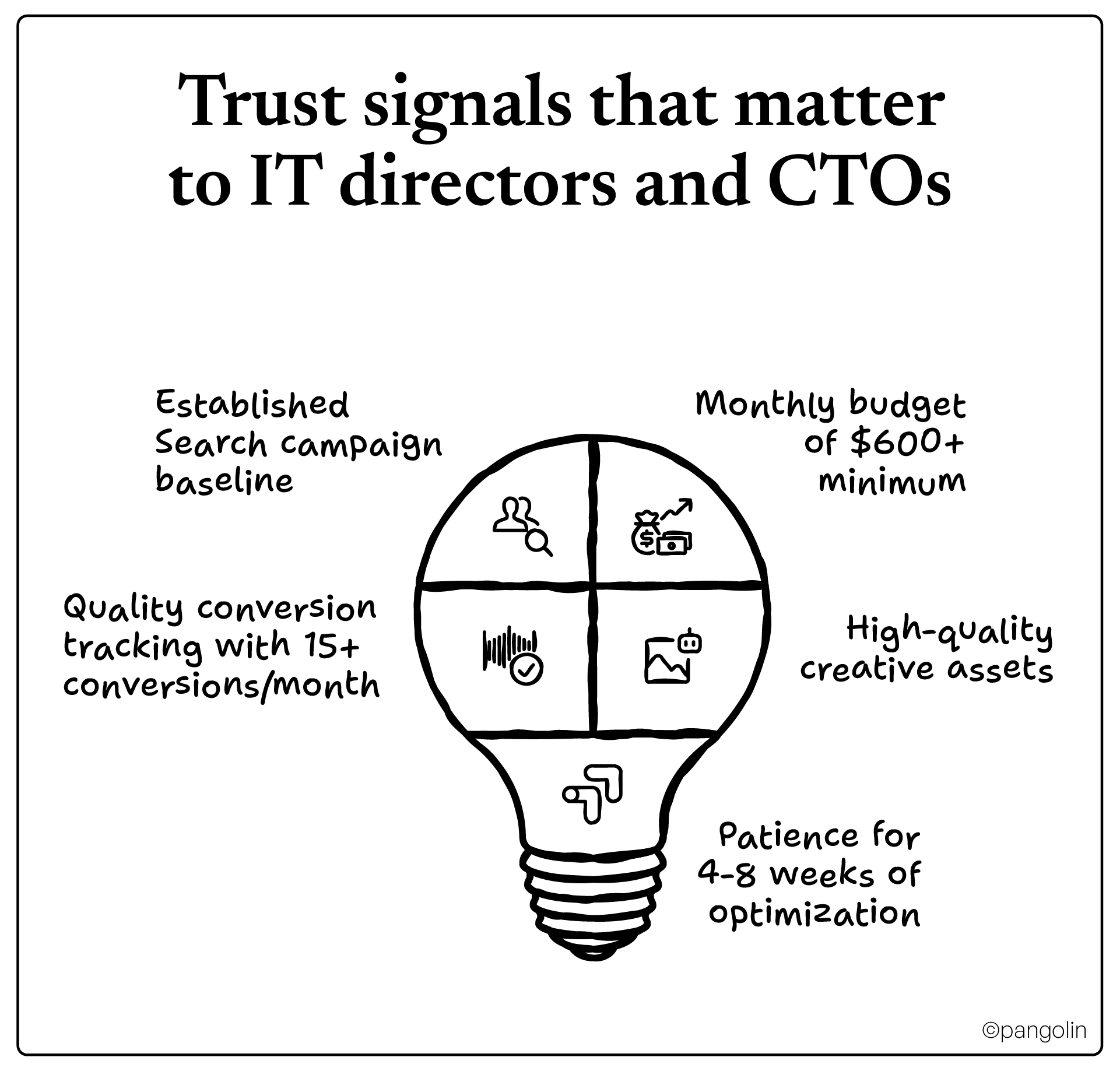
Performance Max delivers results when you have:
Established Search campaign baseline
Don't launch Performance Max as your first campaign. You need conversion data and performance benchmarks from Search first.
Monthly budget of $600+ minimum
Performance Max needs volume to optimize. Under $600/month, it won't gather enough data.
Quality conversion tracking with 15+ conversions/month
The AI needs conversion data to learn. Without it, you're gambling.
High-quality creative assets
Multiple images, videos, headlines, descriptions. The algorithm tests combinations, give it good raw materials.
Patience for 4-8 weeks of optimization
Performance Max takes time to learn. Judging in week one wastes the investment.
Best use case for IT services: Complementing proven Search campaigns to expand reach across YouTube, Display, and Discovery while maintaining lead quality.
When Performance Max wastes your budget
Avoid Performance Max if you:
Haven't run successful Search campaigns yet You need baseline data. Performance Max without Search data is guesswork.
Have limited budget (<$500-600/month) Won't generate enough volume for algorithm to optimize effectively.
Need granular control over targeting Performance Max is a "black box", you can't micromanage like traditional campaigns.
Serve very niche/specialized services Broad AI optimization struggles with hyper-targeted audiences.
Can't wait 4-8 weeks for results If you need leads next week, stick with proven Search campaigns.
Bottom line: Use Performance Max alongside Search campaigns, not as a replacement. Allocate 20-30% of budget to Performance Max after Search is performing well.
Retargeting: The unsexy tactic that drives ROI
Remember: 70% of the buyer journey happens before first contact. Decision-makers visit your site, read content, check pricing, then disappear for 3 months to evaluate competitors and build internal consensus.
Retargeting keeps you top-of-mind during that evaluation period.
Display retargeting strategy:
Audience segments by behavior:
Blog/content readers → Nurture with educational content (30-60 day window)
Service page visitors → Promote demos and consultations (45-90 day window)
Pricing page visitors → Offer quotes and assessments (60-90 day window)
Form abandoners → Remind to complete request (7-30 day window)
Frequency cap: 3-5 impressions per person per week. More = ad fatigue and brand damage.
Budget allocation: 15-20% of total Google Ads budget to retargeting.
Pro tip: Create separate audiences by service type. Someone who visited "Cybersecurity Services" gets different retargeting than someone who visited "Cloud Migration."
Metrics That Actually Matter (Stop Tracking Vanity)
Marketing-influenced revenue (total pipeline value from Google Ads)
Customer acquisition cost (CAC) by channel
Return on ad spend (ROAS)
Customer lifetime value (LTV) from PPC leads
CAC payback period (months to recover acquisition cost)
Funnel velocity:
Sales cycle length from PPC leads vs. other channels
Time from click to qualified lead
Time from lead to closed deal
These metrics tell you if Google Ads is actually growing your business or just burning budget.
Attribution: Giving credit where it's due
The last-click trap: Google Ads default attribution credits only the final touchpoint before conversion. But if a prospect clicked your blog post from Google Ads in January, visited from organic search in February, then submitted a demo request from a retargeting ad in March, which campaign "earned" the conversion?
All of them. That's why multi-touch attribution matters.
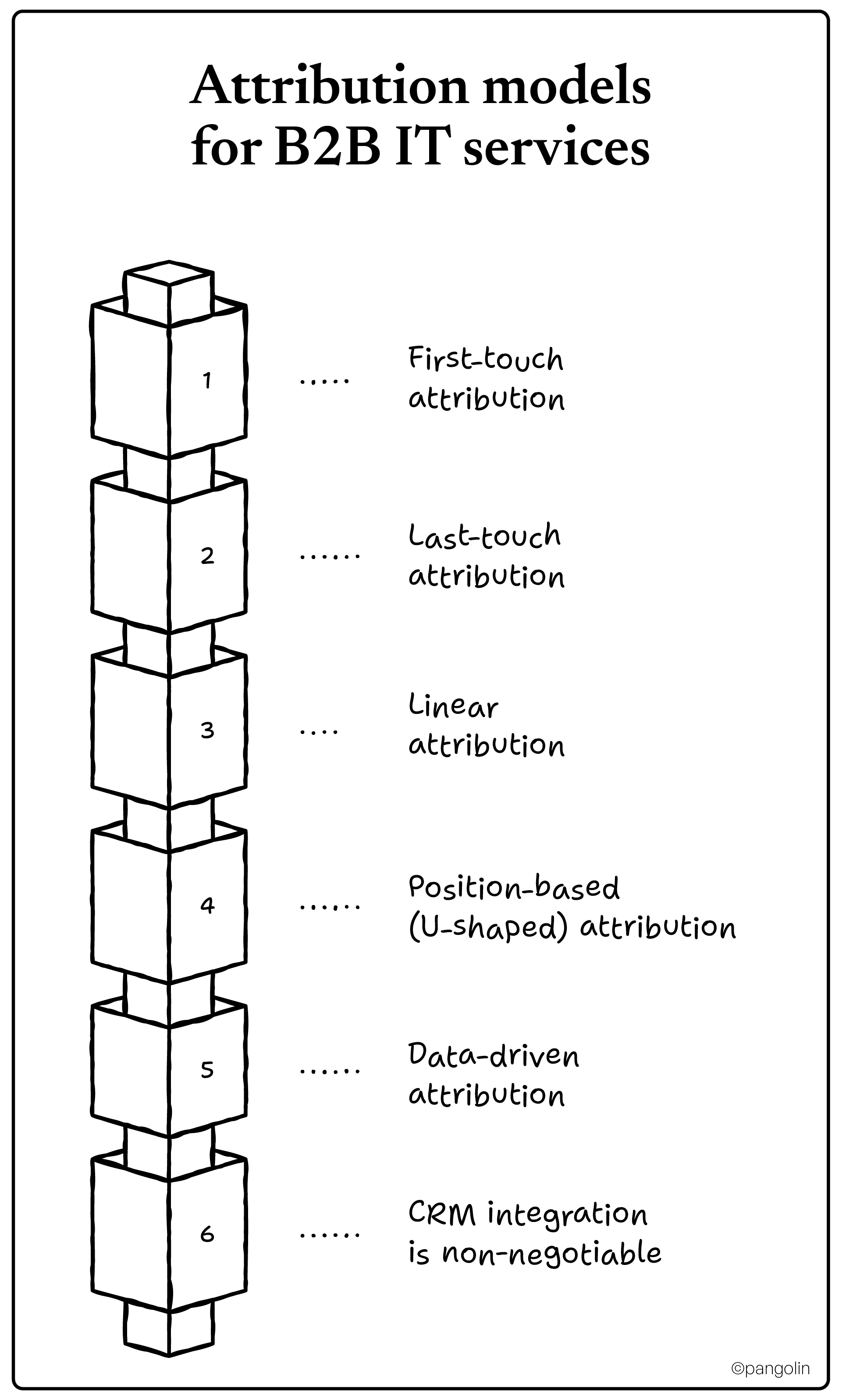
Attribution models for B2B IT services:
First-touch attribution:
Credits the campaign that started the relationship
Good for understanding which campaigns build awareness
Undervalues nurturing and conversion campaigns
Last-touch attribution:
Credits the final campaign before conversion
Good for understanding what closes deals
Undervalues top-of-funnel campaigns that start relationships
Linear attribution:
Splits credit evenly across all touchpoints
Fair but doesn't account for varying importance
Position-based (U-shaped) attribution:
Gives 40% credit to first touch, 40% to last touch, 20% distributed across middle touches
Best for B2B IT services with long sales cycles
Recognizes both starting relationship and closing it matter most
Data-driven attribution:
Google's machine learning determines credit based on actual conversion patterns
Create industry-specific ad groups (healthcare, finance, etc.)
Success metrics for Month 2:
CPL trending downward as optimization takes effect
Conversion rate improving (target 3-5%)
Negative keyword list growing to 100+ terms
Lead quality scores improving
Month 3: Scale and advanced tactics
Advanced campaigns:
Launch Performance Max (if budget supports $600+/month)
Add top-of-funnel awareness campaigns
Implement multi-touch attribution tracking
Create landing page variants by industry vertical
Launch YouTube video campaigns (if creative assets available)
Systematic optimization:
Weekly search term review and negative keyword additions
Bi-weekly landing page A/B tests
Monthly keyword expansion research
Quarterly competitive analysis
Regular conversion rate optimization initiatives
Success metrics for Month 3:
Profitable ROAS (2:1 minimum, 4:1+ target)
Consistent qualified lead flow (10-20+ per month depending on budget)
CAC within acceptable range for your LTV
Sales team satisfaction with lead quality
From Squirrels to Strategy: The Choice Is Yours
Those California ground squirrels didn't overthink adaptation. When their environment changed and traditional food sources couldn't sustain them, they evolved. Fast.
Your IT services company faces the same inflection point.
The referral networks and word-of-mouth that built your business won't scale to your growth targets. Your CEO wants predictable pipeline. Sales needs qualified leads, not tire-kickers. And you're stuck proving marketing ROI with Google Ads campaigns that bleed budget on job seekers and DIY hobbyists.
The good news: IT companies consistently generate $2-$8 return for every $1 invested in Google Ads when campaigns are structured correctly.
The difference between those numbers, wasting budget versus generating qualified pipeline, isn't luck. It's strategy. It's understanding that B2B IT services require full-funnel campaigns, not bottom-funnel urgency tactics. It's knowing that $11 average CPC can be profitable when you're closing $50K annual contracts. It's tracking qualified leads and revenue, not clicks and impressions.
You now have the frameworks:
Conversion tracking that measures quality, not just volume
Campaign structures organized by service and funnel stage
Keyword strategies that attract decision-makers and block time-wasters
Ad copy formulas that build trust instead of begging for clicks
Landing pages optimized for B2B tech buyers, not impulse purchasers
Performance Max guidance that prevents $10K+ mistakes
Measurement systems that connect ad spend to closed revenue
Implementation is where most IT companies stumble. Not because the tactics are complex, they're not. But because systematic optimization, weekly negative keyword management, continuous landing page testing, and multi-touch attribution require expertise and dedicated time most solo marketers don't have.
Ready to turn Google Ads into a predictable lead generation engine?
Pangolin Marketing helps IT services companies build complete Google Ads systems that generate qualified leads, not just traffic. We specialize in B2B tech marketing with proven frameworks for ITES companies , combining strategic positioning with tactical execution that actually moves the needle.
Our approach:
Full-funnel campaign strategies designed for long B2B sales cycles
Landing page optimization for IT decision-makers
CRM integration and multi-touch attribution
Weekly optimization and negative keyword management