

It’s 2025, and the internet is officially obsessed with AI-generated cat reels. Seriously. Animated cats with dramatic backstories and villainous monologues are pulling in more views than most Super Bowl ads. It’s weird, it’s unexpected, and it works because it cuts through the noise.
But when you're marketing IT services, trying to be "weird and unexpected" usually just means burning through your ad budget with nothing to show for it.
Let's get real. Your Google Ads dashboard proudly displays 1,247 clicks this month. Your sales pipeline, however, shows... three qualified leads. The math isn't mathing, and your stomach drops every time you have to report on KPIs.
Here’s the hard truth most agencies won’t tell you: your campaigns are failing because you're applying simple consumer marketing tactics to a complex B2B world. You’re not selling a trendy water bottle; you’re selling a six-figure cybersecurity overhaul.
Your buyers aren't making an impulse purchase. They're navigating a three-to-six-month decision process involving a whole committee of stakeholders.
You're stuck trying to squeeze complex value propositions like "zero-trust architecture" into a 30-character headline. All while bigger competitors with deeper pockets outspend you on every valuable keyword.
Your boss is demanding to see a clear ROI, but your attribution model is a tangled mess. The few leads you do manage to capture are tire-kickers who just wanted to download your whitepaper.
It feels like you’re pouring money directly into a leaky bucket.
But the problem isn’t your budget. It’s your playbook. And it's time to get a new one.
If you're treating your IT services Google Ads campaign like you're selling sneakers, you're lighting money on fire. The "top 10 PPC tips" you read on a generic marketing blog won't work here. They're written for a completely different game.
Think about it. Buying a pair of shoes is a quick, emotional decision. Buying a six-figure managed IT services contract? That's a marathon. It involves a half-dozen decision-makers, three months of meetings, and a level of trust that a flashy ad simply can't buy.
This is the B2B reality that most Google Ads advice ignores:
This is where IT marketers get trapped. They use broad match keywords that attract job seekers looking for "IT jobs" instead of CEOs looking for "IT solutions." They create campaigns based on their internal list of services, not on the actual problems their customers are trying to solve. They get excited about a low cost-per-click, not realizing those clicks are from unqualified prospects who will never become customers.
The numbers tell the story. The average Google Ads conversion rate for the tech industry is around 2-3%. While that sounds low, the value of a single conversion can be astronomical. The goal isn't to get the most clicks; it's to get the right clicks.
If you’ve been following the generic advice, it's not your fault that it's not working. You’ve just been using the wrong map. It's time to get one that's actually designed for the territory you're in.
Enough about the problem. Let's get to the solution.
If the old playbook is broken, you need a new one. One that’s built specifically for the long, complex, high-stakes world of B2B IT services. Forget the generic advice. We're going to use the TECH Method.
It’s a simple, four-part framework designed to stop the budget bleed and turn your Google Ads account into a predictable lead generation engine.

Flowchart showing the TECH method framework for structuring IT services Google Ads campaigns
Stop organizing your campaigns around your internal list of services. Your prospects aren't searching for "Our Managed Services Package." They're searching for answers to their problems.
Your campaigns should mirror their journey:
By structuring your campaigns around these three stages of intent, you meet buyers exactly where they are, with a message that resonates. You're no longer a seller; you're a problem-solver.
In B2C, you can win with volume. In B2B, a thousand unqualified clicks are worthless. One perfect-fit lead can be worth six figures. Your entire strategy should be engineered to attract the right people and repel the wrong ones.
Nobody ever bought a six-figure IT contract because of a feature. They bought it because they trusted the outcome. Your ads and landing pages need to scream credibility.
Stop trying to be everything to everyone. The beauty of B2B is that you don't need thousands of customers. You just need a few of the right ones. It's time to go elephant hunting.
This means integrating your PPC with an Account-Based Marketing (ABM) strategy. Identify a target list of 50-100 high-value companies in your area that would be dream clients. Then, use Google Ads' audience targeting features to focus your budget exclusively on getting in front of the decision-makers at those specific companies.
You can layer in audience data from LinkedIn to target users by their job title, industry, or company size. Instead of shouting into the void, you're whispering directly into the ear of your ideal buyer. The cost-per-click might be higher, but your cost-per-qualified-pipeline will drop dramatically.
This is the foundation. Now, let's break down exactly how to structure your campaigns around buyer intent.
Let’s be honest. Your Google Ads account is probably structured something like this:
It’s logical, it’s clean, and it’s completely wrong.
This structure is built around your company. But your customers don’t care about your internal departments. They care about their own problems. Nobody wakes up thinking, "I'd love to buy some 'Managed IT Services' today." They wake up thinking, "Why is the server down again?"
Your campaign structure should be a mirror of your customer's mind. When you align your ads with their problems, you stop being just another vendor and start becoming a trusted guide.
Instead of campaigns named after your services, create campaigns named after the outcomes you deliver.
.webp)
Here’s how to build it out, act by act, following your customer's journey:
This is for prospects who are feeling the pain but don't know the solution yet. They are using Google to diagnose their problems.
These prospects have put out the initial fire. They now understand their problem and are actively researching solutions.
This is the final act. These prospects have decided on a solution and are now choosing a vendor. They are the hottest leads.
Here's what this structure looks like in the real world for a fictional IT company called "SecureNet IT" :
This problem-first structure ensures you're delivering the right message to the right person at the right time. You're no longer just another ad; you're the answer they were searching for.
Now that your campaigns are structured for success, let's talk about the fuel that makes them run: keywords.
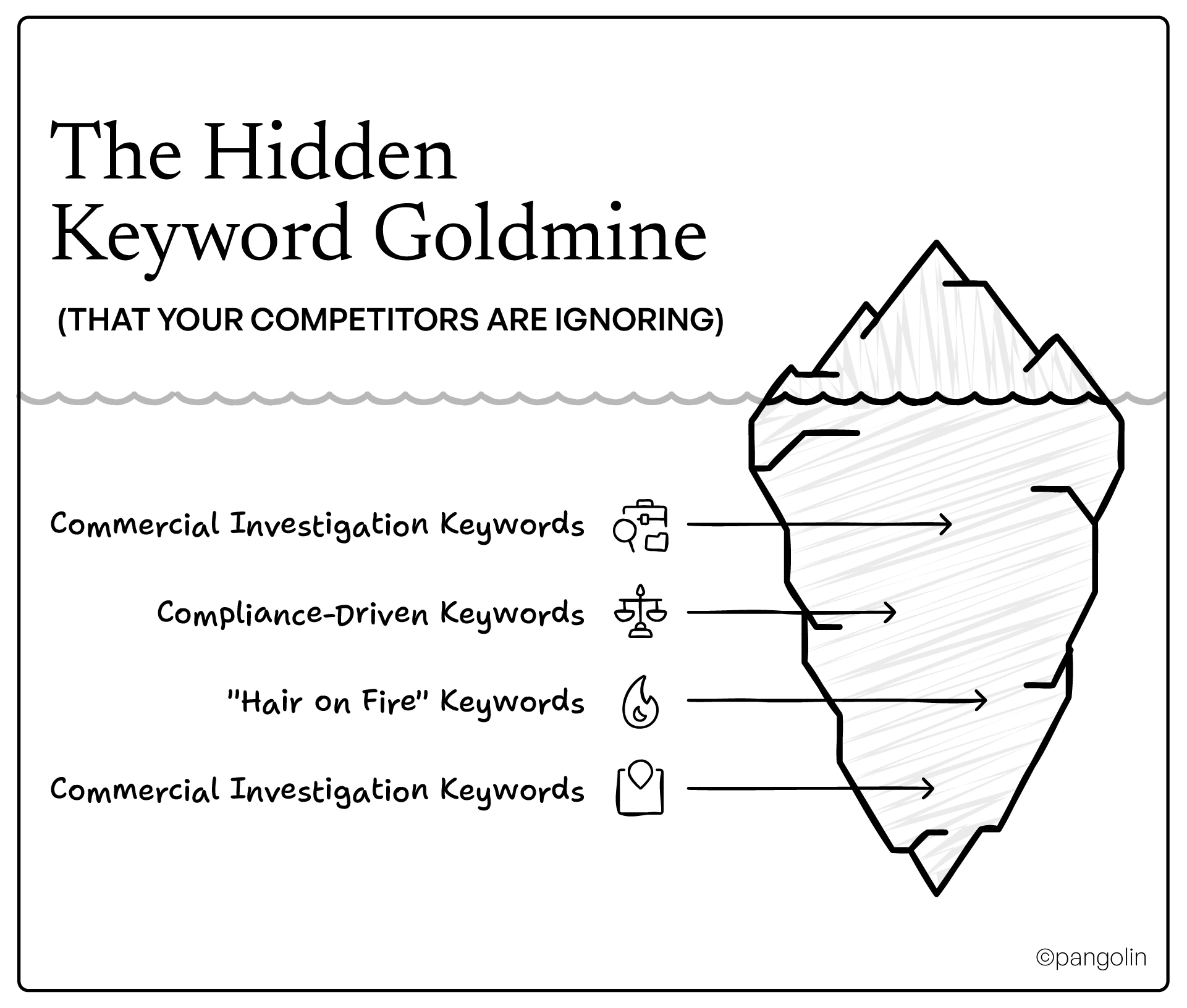
If your campaign structure is the engine, then keywords are the fuel. And right now, you're probably paying premium prices for low-grade gas. Most IT companies get into a bidding war over the same obvious, expensive keywords like "managed IT services" or "cybersecurity," while a goldmine of high-intent keywords sits right under their noses.
These aren't just any keywords. They are digital flare guns, signals that a prospect has a real problem and is actively looking for a paid solution.
Forget the broad terms for a moment. The real money is in these four categories:
So, how do you find these golden keywords? You don't start with a keyword tool. You start by listening.
A great keyword strategy is as much about repelling the wrong people as it is about attracting the right ones. Your negative keyword list is the bouncer for your ad campaign, turning away the tire-kickers and time-wasters at the door. Be ruthless.
Your "do not serve" list should include terms related to:
By finding the right keywords, you ensure you're not just getting clicks, you're getting clicks that have a real chance of turning into revenue.
Now that you're armed with keywords that convert, it's time to write the ad copy that will seal the deal.
Ad Copy That Builds Trust (Not Just Clicks)
Here’s where most IT services ads fall flat: they try to be clever. They use witty taglines and vague promises, hoping to charm their way into a click. But in the high-stakes world of B2B IT, your prospects aren't looking for a clever new friend. They’re looking for a credible, reliable partner who can solve a mission-critical problem.
Cleverness is cheap. Credibility is priceless.
Your ad copy has one job: to build as much trust as possible in the few characters you’re given. Every word should be a brick in that wall of credibility.
Ditch the creative brainstorming sessions and use a simple, powerful formula for your headlines:
Problem + Credibility Signal + Solution
Let's break it down:
Here’s what it looks like in action:
Server Down? 15-Min Response Since 2010 | 24/7 IT Support
This headline is a powerhouse. It acknowledges the problem ("Server Down?"), provides two massive credibility signals ("15-Min Response," "Since 2010"), and offers a clear solution ("24/7 IT Support").
Then, in your description, you seal the deal by focusing on outcomes, not just features.
You have more trust-building assets than you think. Your ads should be packed with them.
Use Google Ads extensions to inject even more proof.
Let's see the transformation.
Managed IT Services | Acme IT Solutions
We provide a full range of managed IT services for your business. Our proactive monitoring and support will keep your systems running smoothly. Contact us today for a free quote!
This ad is invisible. It sounds like every other IT company on the planet.
Stop IT Headaches For Good | Acme IT - Since 2005
Prevent costly downtime with our 15-min response guarantee. Trusted by 150+ Chicago businesses to keep their tech running smoothly. Get a free, no-obligation IT assessment.
See the difference? The second ad is specific, credible, and speaks directly to the desired outcome. It doesn’t just ask for a click; it earns it.
Now that you've earned the click with a trustworthy ad copy, you have to deliver on that promise with a landing page that converts. Let's build it.
That's a wrap on Part 1! We've covered the core strategic mindset you need to win at Google Ads, from structuring your campaigns by intent to writing ad copy that builds instant trust.
In Part 2 of this ultimate guide, we'll shift from strategy to execution. We'll provide a step-by-step walkthrough for building high-converting landing pages, managing your budget like a pro, tracking the metrics that actually matter, and avoiding the common mistakes that sabotage most IT services campaigns. Stay tuned
The biggest mistake is treating a complex, high-stakes B2B sale like a simple B2C transaction. They apply generic marketing tactics that completely miss the mark for the long sales cycles and multi-stakeholder buying committees typical in IT services.
Because your customers don't search for your internal service names; they search for solutions to their problems. Structuring campaigns by the buyer's stage of awareness (Problem-Aware, Solution-Aware, Vendor-Aware) ensures your message is relevant to them at every step, which builds trust and improves performance.
Message match is the alignment between the promise in your ad and the content on your landing page. If a user clicks an ad for "emergency server repair" and lands on a generic homepage, trust is broken. A perfect message match reassures the user they are in the right place, which boosts your Quality Score, lowers your costs, and dramatically increases conversion rates.
The golden rule is to keep ad groups small and tightly themed, no more than 15-20 closely related keywords. This allows you to write hyper-relevant ad copy that speaks directly to that specific search query, which is impossible with large, bloated ad groups.
The goldmine is in high-intent keywords that signal a user is close to making a purchase. These include "commercial investigation" keywords (with terms like "pricing," "cost," "vs"), "compliance-driven" keywords (like "HIPAA compliant"), and "hair on fire" keywords that show urgency ("emergency," "24/7 support").
Because buying IT services is a high-risk decision. Prospects aren't looking for a witty tagline; they are looking for a credible, reliable partner. Your ad copy's primary job is to reduce their fear and build their confidence by using concrete trust signals like years in business, certifications, and guarantees.
Absolutely. You can't outspend them, so you must out-think them. Use your local presence as a superpower with aggressive geographic targeting. Focus on a niche service or industry that the big brands overlook. Your agility and local credibility are advantages they can't match.

