Your Landing Page is Your Handshake: Your landing page has about eight seconds to build trust. It must have a clear headline that matches the ad, strong social proof, and a single, compelling call to action.
Budget Like a CFO: Use the 60/25/15 rule to allocate your budget: 60% on high-intent, bottom-funnel campaigns; 25% on mid-funnel nurturing; and 15% for testing and experimentation.
Track Revenue, Not Clicks: Ditch the vanity metrics. Focus on the numbers that matter to your business: Cost Per Qualified Lead, Lead-to-Customer Rate, and Customer Lifetime Value.
Connect Your CRM: Integrating Google Ads with your CRM is non-negotiable. It's the only way to get a true picture of your ROI by connecting ad spend to closed deals.
Avoid the "Seven Deadly Sins": Be disciplined. Avoid common mistakes like relying on broad match, ignoring mobile optimization, and not tracking phone calls. These silent killers are draining your budget.
Welcome back. In Part 1 of this guide, we laid the strategic foundation for a successful IT services Google Ads campaign. We covered why generic B2C tactics fail, introduced the TECH Method (Target, Engineer, Convert, Hunt), and broke down how to structure your campaigns and ad copy to build instant trust.
You’ve earned the click. Now it’s time to close the deal.
In Part 2, we shift from strategy to execution. We’ll walk through how to create landing pages that convert, manage your budget like a pro, track the metrics that actually matter to your CEO, and avoid the silent killers that sabotage most IT marketing efforts.
Your Landing Page Has 8 Seconds to Prove You're Not Another Vendor
You did it. You crafted the perfect ad, earned the click, and a high-value prospect has just landed on your page. The clock is now ticking. You have about eight seconds to answer their one, unspoken question: "Am I in the right place?"
If your landing page is a generic, corporate brochure that vaguely promises "synergistic solutions," they're gone. And they're not coming back.
Your landing page isn't a webpage; it's your digital handshake. It needs to be firm, confident, and instantly prove that you are the credible solution they've been searching for.
The Anatomy of an IT Services Landing Page That Actually Converts
Forget fancy design trends. A landing page that closes deals follows a simple, powerful formula.
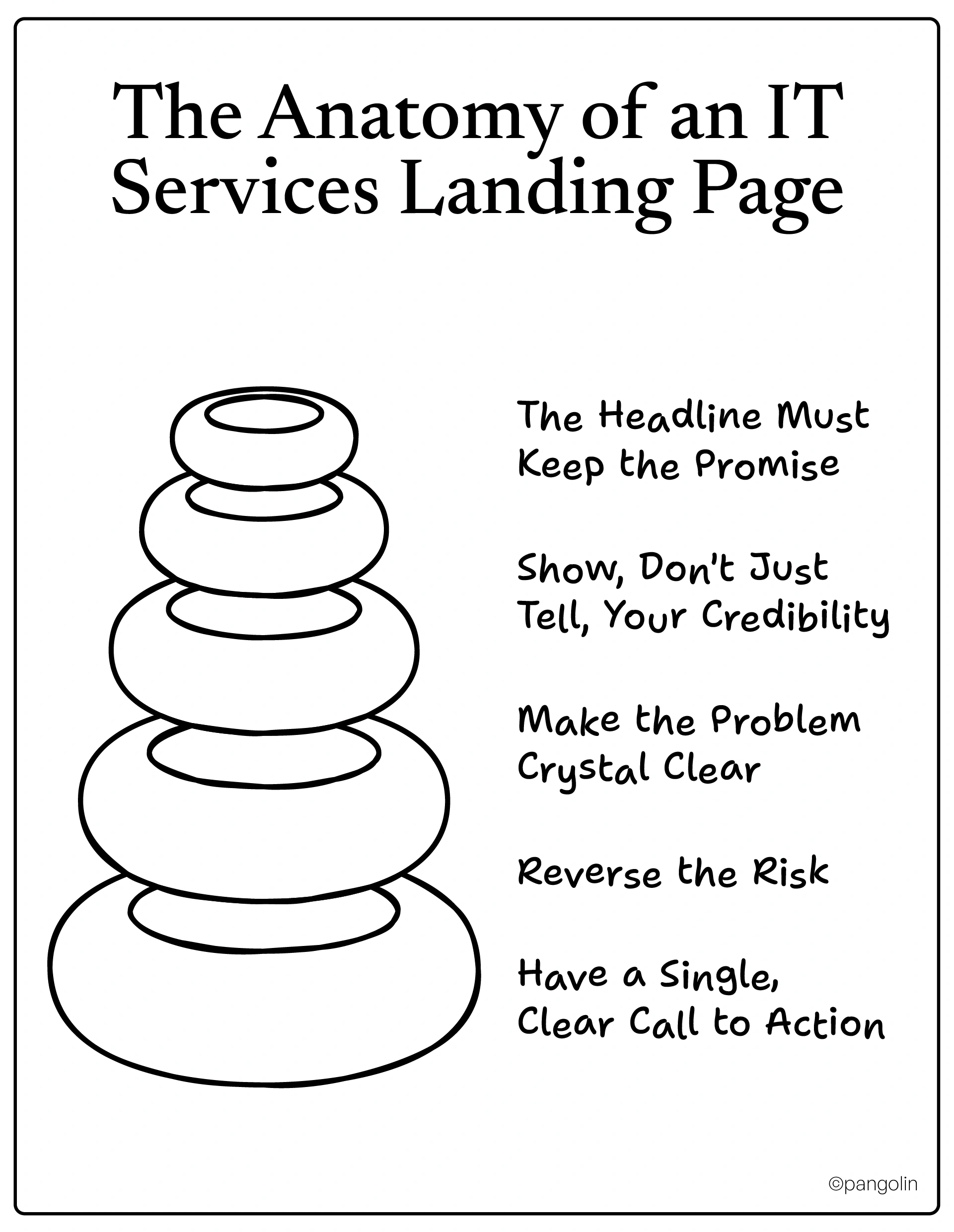
The Headline Must Keep the Promise. The headline of your landing page should be a direct echo of the ad they just clicked. If the ad said, "Stop Ransomware Attacks," the headline better not say, "Welcome to Acme IT." This concept, called "message match," is the single most important element for building instant trust.
Show, Don't Just Tell, Your Credibility. Below the headline, immediately display your social proof. This isn't the time to be modest.
A "Trusted By" logo bar of your most impressive clients.
A powerful, one-sentence testimonial from a happy customer.
Make the Problem Crystal Clear. Briefly agitate the pain point they're experiencing. Use a short paragraph or a few bullet points to show you understand their world. "Every minute of downtime costs you money. Unsecured employee laptops are a lawsuit waiting to happen."
Reverse the Risk. The decision to hire an IT firm is scary. It's a big commitment. Your landing page needs to actively reduce that fear.
Offer a "Free, No-Obligation Security Assessment."
Promise "No Long-Term Contracts."
Guarantee your response time.
Have a Single, Clear Call to Action. Do not give them a dozen options. The goal of the page is to get them to take one specific next step.
Weak: "Contact Us"
Strong: "Get Your Free Security Scorecard" or "Schedule a 15-Minute Strategy Call"
The Trust-Builders That Seal the Deal
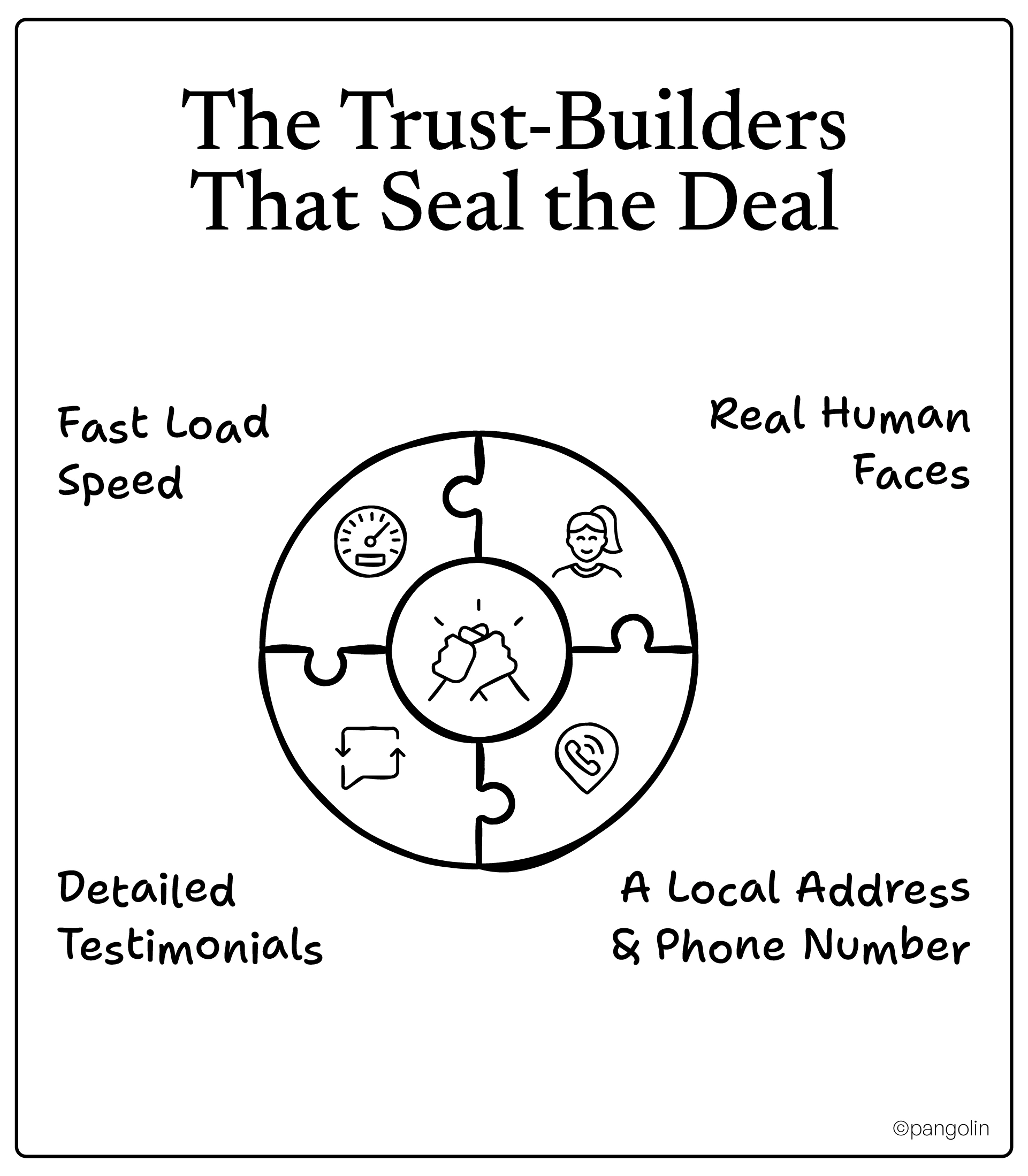
Sprinkle these elements throughout your page to reinforce credibility:
Real Human Faces: Use photos of your actual team, not stock photos. People trust people.
A Local Address & Phone Number: This shows you're a real, established business, not a fly-by-night operation.
Detailed Testimonials: Go beyond a simple quote. Use the client's full name, company, and a photo if possible.
Fast Load Speed: On mobile, every second of load time kills conversions. Your page needs to be lightning-fast. A B2B decision-maker checking your site between meetings will not wait.
A Concrete Example of Transformation
We worked with a cybersecurity client whose landing page was converting at a dismal 1.5%. It was a wall of text with a generic "Contact Us" form at the bottom.
We rebuilt it using this formula:
Changed the headline to match the ad.
Added a logo bar of their three largest clients "above the fold."
Replaced the "Contact Us" form with a button for a "Free 30-Point Security Audit."
Added a direct quote from a well-known local CEO.
The result? Their conversion rate jumped to 6.2% in the first month. They didn't change their service or their pricing. They just started building trust from the first second.
Your landing page is your most important salesperson. Make sure it knows how to close.
Now that we have them on the hook, let's talk about how to manage your budget and bidding to do this profitably.
How to Compete with Big IT Firms on a Small Budget
Competing with the big players in PPC feels like bringing a slingshot to a tank fight. They have massive budgets, dedicated teams, and brand recognition. But you have a secret weapon: agility. You can be smarter, faster, and more efficient with every dollar you spend.
Here’s how to allocate your budget like a seasoned CFO and bid like a poker pro.
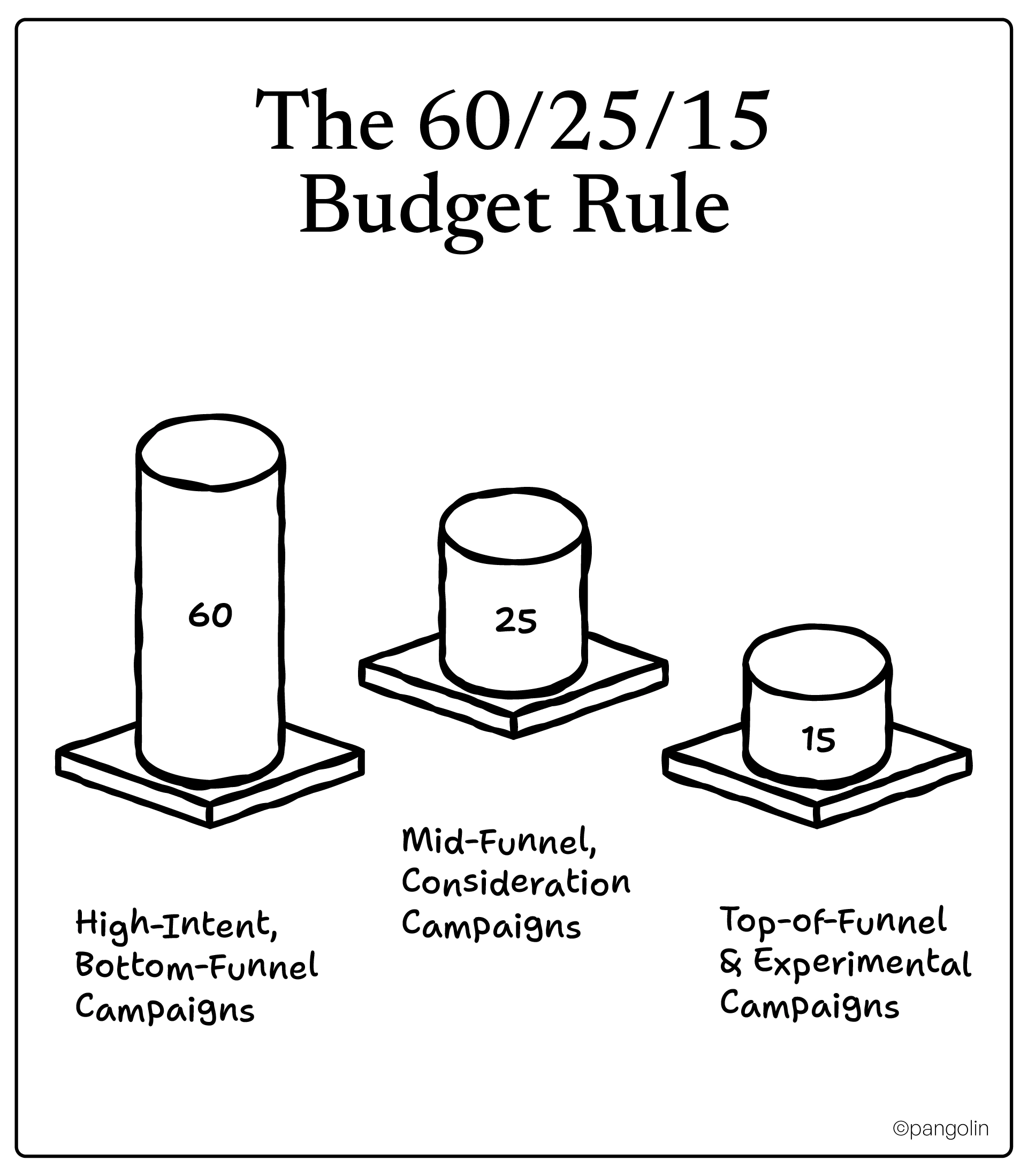
The 60/25/15 Budget Rule
Don't just spread your budget evenly across all campaigns. Weight it heavily toward what's already working. A smart allocation looks like this:
60% on High-Intent, Bottom-Funnel Campaigns: This is your bread and butter. Pour the majority of your budget into the "Decision Stage" keywords, the ones where people are actively looking to buy now ("IT support near me," "[competitor] alternative"). This is where you'll get your fastest ROI.
25% on Mid-Funnel, Consideration Campaigns: Use a quarter of your budget to nurture prospects in the "Consideration Stage." These are the ads that drive them to your case studies and solution pages. You're investing in building the pipeline for next quarter.
15% on Top-of-Funnel & Experimental Campaigns: This is your R&D budget. Use it to test new ad copy, bid on new "Awareness Stage" keywords, and experiment with new audiences. This is where you'll find your next big win, but you do it with a small, controlled portion of your budget.
Bidding Strategies That Punch Above Their Weight
Choosing the right bidding strategy is critical. Don't just set it and forget it.
For New Campaigns (Low Data): Use Enhanced CPC. This is the perfect starting point. You set your bids manually, but you give Google a little bit of leeway to automatically adjust bids for clicks that seem more or less likely to lead to a conversion. You maintain control while benefiting from some of Google's AI.
For Mature Campaigns (High Data): Use Target CPA. Once a campaign has a healthy amount of conversion data (at least 30 conversions in the last 30 days), you can switch to Target Cost-Per-Acquisition bidding. You tell Google how much you're willing to pay for a lead, and its algorithm will work to hit that number.
For Hyper-Competitive Keywords: Use Manual Bidding. For those few, must-win keywords, manual bidding gives you the ultimate control. It's more time-consuming, but it allows you to be incredibly precise, ensuring you show up for the searches that matter most.
Guerrilla Tactics for the Underdog
You can't go head-to-head with the Goliaths everywhere. You have to pick your battles.
Own Your Backyard: Use aggressive geographic targeting. Instead of targeting an entire metro area, focus your budget on a few specific zip codes or a 10-mile radius around your office where you know your ideal clients are.
Work 9 to 5: Use ad scheduling (dayparting) to only run your ads during business hours when B2B decision-makers are actually at their desks. Why waste money on clicks at 2 AM on a Saturday?
Follow the Desktop: While mobile is important, many complex B2B decisions are still made on a desktop computer. Analyze your device data. If you see that 90% of your conversions happen on desktops, adjust your bids to favor them.
You don't need a massive budget to win at Google Ads. You just need a smarter strategy. By allocating your funds wisely and using these guerrilla tactics, you can run circles around the big, slow-moving competitors.
Now that your budget is in order, let's talk about what success actually looks like. It's not what you think.
The Metrics That Actually Matter to IT Services (It's Not Clicks)
Let's be brutally honest for a second. Your CEO doesn't care about your click-through rate. Your sales team doesn't care about impressions. And your CFO definitely doesn't care how many new followers you got on LinkedIn.
They care about one thing: revenue.
If you walk into a meeting armed with a chart showing a spike in website traffic, you're going to get polite nods and a mental note from your boss to "check in on marketing spend." If you walk in showing how your campaigns shortened the sales cycle by 30 days, you're a hero.
It's time to stop reporting on vanity metrics that make you feel busy and start tracking the business metrics that prove your value.
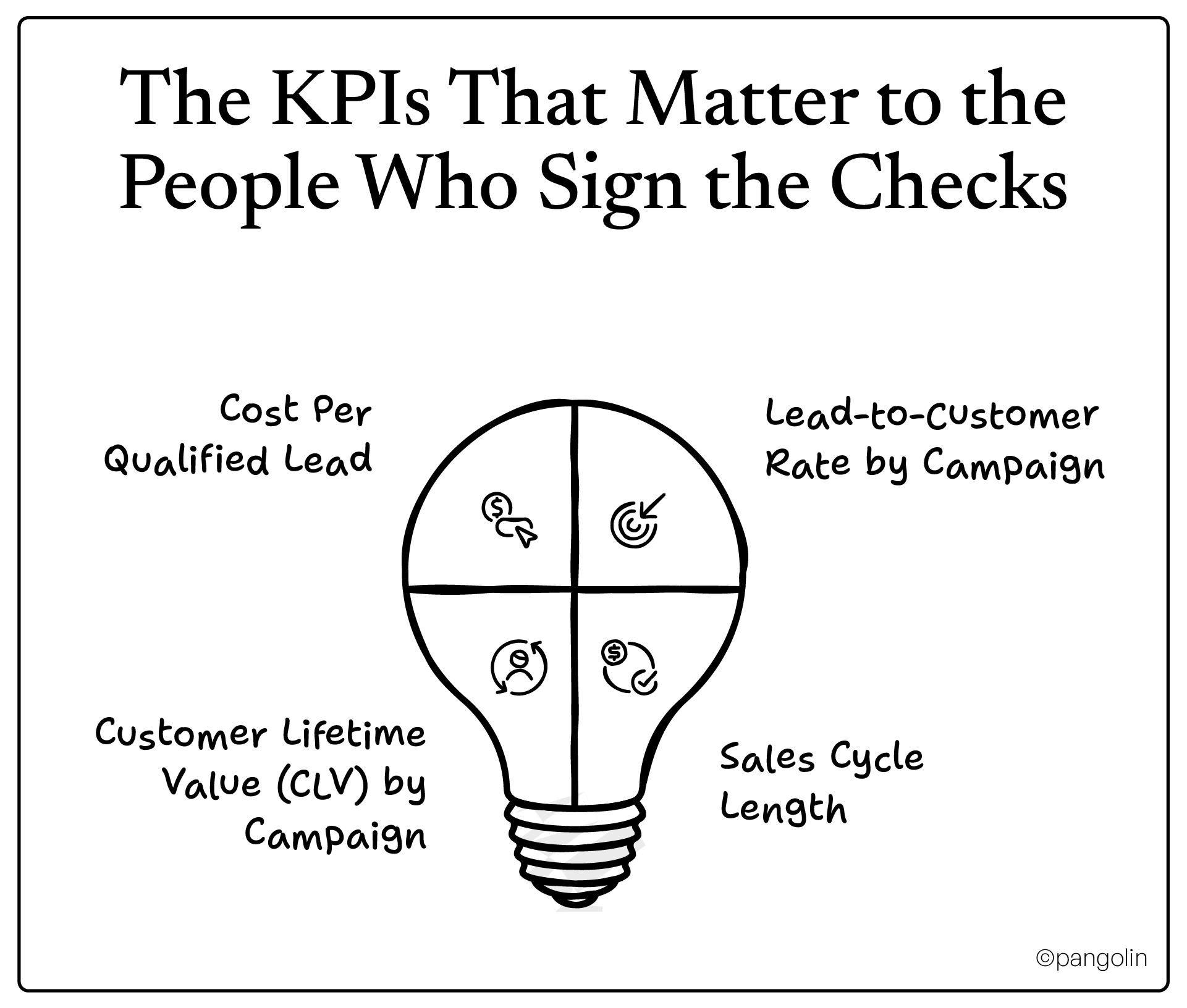
The KPIs That Matter to the People Who Sign the Checks
In the world of B2B IT, only a few numbers really matter. Focus on these, and you'll always have a seat at the table.
Cost Per Qualified Lead: Stop celebrating a low cost-per-lead. A "lead" could be a college student writing a research paper. A qualified lead is a decision-maker at a company that fits your ideal customer profile, has a budget, and has a problem you can solve. This is your real cost of customer acquisition.
Lead-to-Customer Rate by Campaign: This is the ultimate truth-teller. It doesn't matter if one campaign generates 100 leads and another generates 10. If the first one resulted in zero customers and the second one resulted in two, you know where to put your money.
Customer Lifetime Value (CLV) by Campaign: Go one step further. You might find that leads from your "Cybersecurity" campaign have a 3x higher lifetime value than leads from your "IT Support" campaign. This insight is pure gold. It tells you which campaigns are not just bringing in customers, but bringing in the best customers.
Sales Cycle Length: Track the time from the first click to the signed contract. If you can show that leads from your PPC campaigns close 20% faster than leads from other channels, you've just proven an undeniable ROI.
Waking Up from the Attribution Nightmare
The biggest headache for any B2B marketer is attribution. With a six-month sales cycle and five different people involved in the decision, who gets the credit? The default "last click" model in Google Ads is a fantasy. It's like giving all the credit for a Super Bowl win to the player who scored the final touchdown, ignoring the months of training, the coaches, and the rest of the team.
Here's how you get closer to the truth:
Connect Your CRM. Period. This is not optional. You must integrate Google Ads with your CRM (HubSpot, Salesforce, etc.). It's the only way to connect a click that happened in May with a deal that closed in October.
Track Offline Conversions. The most important conversions in B2B happen offline, on a phone call or in a demo. If you're not tracking these and feeding that data back into Google Ads, you're flying blind. Use a call tracking tool like CallRail to bridge this gap.
Use a Multi-Touch Attribution Model. Switch from the default "last click" model to one like "linear" or "position-based" in Google Ads. It's not perfect, but it gives you a much more realistic picture of which campaigns are influencing the entire journey.
When you start tracking the metrics that matter, you stop having conversations about marketing "spend" and start having conversations about marketing "investment." And that's a conversation you'll always win.
Now, let's look at the silent killers, the common mistakes that are draining your budget right now without you even knowing it.
The 7 Deadly Sins of IT Services Google Ads
Sometimes, the biggest wins in PPC don't come from finding a new strategy, but from stopping the leaks in your current one. Even seasoned marketers fall into these traps. They are the seven deadly sins of IT services advertising, and they are quietly costing you a fortune.
Are you guilty of any of these?
1. The Sin of Laziness: Relying on Broad Match Keywords
You trust Google a little too much, letting broad match run wild without a strong negative keyword list. This is the equivalent of leaving your front door unlocked. You end up paying for clicks from students writing research papers, technicians looking for jobs, and DIYers trying to fix their home wifi.
2. The Sin of One-Size-Fits-All: The Generic Landing Page
You send a prospect who clicked on a hyper-specific ad for "emergency ransomware removal" to your generic homepage. The message mismatch is jarring. They feel misunderstood and immediately bounce. You made a specific promise in your ad and broke it on the landing page.
3. The Sin of Desktop-Only Thinking: Ignoring Mobile
Your landing page looks gorgeous on your big office monitor, but it's a nightmare on a phone. The text is too small, the buttons are impossible to tap, and the form is a mile long. That CEO checking out your site between meetings just gave up and moved on to your competitor.
4. The Sin of Invisibility: Not Tracking Phone Calls
A prospect sees your ad, is impressed, and decides to call the number in your ad extension. They become your biggest client of the year. But because you don't have call tracking, your Google Ads dashboard shows that campaign produced zero conversions. So you pause it, unknowingly killing your most profitable channel.
5. The Sin of Timidity: Dipping a Toe in Competitor Bidding
You decide to bid on your main competitor's brand name, but you're nervous, so you set a tiny budget. Your ad shows up at the bottom of the page 5% of the time, getting a few meaningless clicks. You're wasting money without ever making a real impact. It's an all-or-nothing game.
6. The Sin of Forgetfulness: Ignoring Your Existing Customers
Your entire PPC strategy is focused on acquiring new logos. You completely forget that the easiest sale in the world is an upsell to a happy, existing client. You're not running any campaigns targeting your current customer list for new services, leaving a massive amount of revenue on the table.
7. The Sin of Impatience: Expecting Instant ROI
You launch a brilliant new campaign. Two weeks later, you check the dashboard, see a high cost-per-conversion, and panic. You shut it down. What you didn't see was that three of those "expensive" leads were just beginning their six-month journey to becoming six-figure clients. You planted a tree and dug it up a week later because it hadn't grown apples yet.
Avoiding these seven sins isn't about being a better marketer. It's about being a more disciplined one.
Now, let's put it all together. Here is your 30-day action plan to transform your Google Ads account from a budget drain into a lead machine.
From Bleeding Money to Generating Leads: Your 30-Day Action Plan
You’ve made it this far. You know why your campaigns have been failing and you have the frameworks to fix them. But knowledge without action is just expensive trivia. It’s time to get your hands dirty.
Here is a realistic, week-by-week plan to transform your Google Ads account from a cost center into a predictable growth engine.
Week 1: Triage and Foundation
The first week is all about stopping the bleeding. You need to plug the biggest leaks in your account right now.
Perform a Ruthless Keyword Audit: Your number one priority. Open your "Search Terms" report. Find all the irrelevant queries that are wasting your money ("IT jobs," "free software," etc.) and add them to your negative keyword list. Be merciless.
Review Your Top 3 Landing Pages: Look at your three highest-spend landing pages. Do their headlines perfectly match the ads pointing to them? Do they have clear social proof (logos, testimonials) above the fold? Are they mobile-friendly? Make these quick fixes now.
Check Your Campaign Structure: Are your campaigns organized by your internal services ("Managed Services," "Cloud Solutions")? Make a note. You'll fix this next week, but for now, you need to know where the problems are.
Week 2: Rebuild and Relaunch
Now that you've stopped the major leaks, it's time to rebuild a small part of your account the right way.
Choose ONE Campaign to Restructure: Don't try to do everything at once. Pick one service area and rebuild the campaign using the three-act structure: Awareness, Consideration, and Decision.
Rewrite Your Ad Copy: Take the ads in your newly structured campaign and rewrite them using the "Problem + Credibility + Solution" framework. Pack them with trust signals.
Adjust Your Bidding Strategy: Set your new, rebuilt campaigns to "Enhanced CPC." For your older, existing campaigns that have conversion data, consider switching them to "Target CPA."
Week 3: Build Your Dashboard of Truth
This week is all about measurement. It's time to start tracking what actually matters.
Verify Your Conversion Tracking: Double-check that you are tracking every important action, form submissions, demo requests, and especially phone calls. If you're not using a tool like CallRail, now is the time to start a free trial.
Connect Your CRM: This is non-negotiable. Initiate the process to integrate your Google Ads account with your CRM. It's the only way to see the full journey from click to close.
Create a Simple "Metrics That Matter" Dashboard: Build a one-page report (in Google Data Studio or even a simple spreadsheet) that tracks Cost Per Qualified Lead and Lead-to-Customer Rate. Start reporting on this, not just clicks.
Week 4: Analyze and Allocate
You now have a few weeks of data from your new, improved setup. It's time to act on it.
Analyze Performance: Compare the performance of your rebuilt campaign to your old ones. Look at the quality of the leads, not just the quantity.
Reallocate Your Budget: Take the insights you've gained and make a bold move. Shift budget away from your old, underperforming campaigns and toward your new, high-performing one. Double down on what's working.
Plan Your Next Move: Based on your success, choose the next campaign you're going to rebuild using this framework.
Your Toolkit for Success
This journey is easier with the right tools. Here are a few resources to help you along the way:
A free Google Ads account audit checklist.
Keyword research templates for B2B IT.
A swipe file of high-converting ad copy.
A landing page optimization guide.
This 30-day plan involves concrete steps to help you move from guessing to knowing, and start making every single ad dollar work harder for you.
Now, let's bring it all home.
Stop Competing on Price. Start Owning Your Market.
Let's zoom out for a second. Winning at Google Ads isn't about getting the cheapest clicks or the most traffic. It's about building a system, a predictable, scalable machine that generates high-quality leads for your IT services business. It's the difference between being a reactive, "I hope we hit our numbers this month" company and a proactive, "I know exactly where my next ten clients are coming from" company.
The frameworks we've covered aren't just "good ideas." They are a fundamental shift in how you approach customer acquisition.
You now know to structure your campaigns around your customer's problems, not your internal org chart.
You know to build your ads and landing pages on a foundation of trust and credibility, not clever taglines.
And you know to measure your success based on business outcomes, not vanity metrics.
If this feels like a lot to take on, that's because it is. Most IT services companies are too busy running their actual business: managing clients, fixing problems, and putting out fires to become world-class Google Ads experts. And that's okay. You don't have to be.
At Pangolin, this is all we do. We live and breathe B2B tech marketing. We've helped over 50 IT services companies just like yours transform their Google Ads from a money pit into their number one source of qualified leads. We've taken messy, underperforming accounts and turned them into predictable engines for revenue growth.
Ready to stop guessing and start growing?
Let's find out exactly where your ad spend is going to waste. We'll provide a free, no-obligation audit of your Google Ads account and give you a concrete, actionable plan to improve your ROI. No fluff, no hard sell. Just a clear path forward.
FAQs (Part 2)
1. What is the most important element of a high-converting landing page for IT services?
Message match. The headline of your landing page must be a direct continuation of the promise made in your ad. Any disconnect breaks trust instantly. After that, social proof (logos, testimonials, certifications) is critical for building the credibility needed to convert a high-value B2B prospect.
2. What's a smart way to allocate a limited PPC budget?
Use the 60/25/15 rule. Allocate 60% of your budget to high-intent, bottom-of-the-funnel campaigns that are already driving results. Use 25% for mid-funnel campaigns to nurture future prospects, and reserve the final 15% for testing new keywords, ad copy, and audiences.
3. Should I use automated or manual bidding for my IT services campaigns?
It depends on the campaign's maturity. For new campaigns with little data, start with Enhanced CPC to maintain control while getting some AI assistance. For mature campaigns with plenty of conversion data, you can test Target CPA. For hyper-competitive, must-win keywords, manual bidding gives you the most precise control.
4. What's a more important metric: Cost-Per-Click (CPC) or Cost Per Qualified Lead (CPQL)?
Cost Per Qualified Lead, without question. A low CPC is a vanity metric if the clicks are from irrelevant audiences. CPQL tells you how much it's actually costing you to start a conversation with a real, potential customer. It's a metric your CFO will understand and appreciate.
5. Why is connecting my CRM to Google Ads so important for B2B?
Because the most important conversions (i.e., a lead becoming a customer) happen offline, often months after the initial click. Without a CRM integration, you're flying blind, unable to connect your ad spend to actual revenue. This connection is the only way to get a true picture of your ROI.
6. My campaigns get leads, but they never close. What am I doing wrong?
This is a classic symptom of poor lead quality, often caused by using broad match keywords without a strong negative keyword list, or running ads with unclear messaging. You're attracting people who are interested in your content, but not in your services. Audit your search terms report to see what people are actually searching for when they click your ads.
7. How do I know if my landing pages are effective?
Beyond just tracking the conversion rate, use tools like heatmaps (e.g., Hotjar) to see where users are clicking, scrolling, and dropping off. Are they even seeing your call to action? Are they getting distracted by other links? This visual data will give you concrete insights for A/B testing and optimization.